

Chapter 3: Setting Up Your Data
How Records Link
Two questions tell you how any two records connect. Then meet the record that sits in between, and find out what happens to children when a parent is deleted.
Lesson 2 of 8 · 7 min read ·
The last lesson drew lines between records and called them one to many or many to many. This lesson is about getting those lines right. It matters more than any field you add, because every record your team creates will hang off these links, and they are the hardest part of a setup to change later.
How do you work out how two records link?
To work out how two records link, ask two questions about them, out loud, using your own words for the records.
- Can one A have many Bs?
- Can one B have many As?
The two answers tell you the shape.
| Can one A have many Bs? | Can one B have many As? | The link |
|---|---|---|
| Yes | No | One to many, and A is the parent |
| No | Yes | One to many, and B is the parent |
| Yes | Yes | Many to many |
| No | No | Probably not two records. B may be a field on A |
Try it with a company and its contacts. Can one company have many contacts? Yes. Can one contact work for many companies? For most businesses, no. So the link is one to many, and the company is the parent.
Now try a job and the crew. Can one job need several crew members? Yes, a roof replacement might take four people. Can one crew member work on many jobs? Yes, the same person is on a different roof every few days. Two yes answers, so the link is many to many.
The usual mistake is to answer for today instead of for the life of the business. A contact who works for one company now may move to another next year. That's still fine as one to many, because you update the link when they move. But if your work often involves one person acting for several companies at once, such as a bookkeeper or a property manager, the honest answer to the second question is yes.
What is a record in between?
A many-to-many link usually needs a record in the middle. A crew assignment is the clearest example. Each one joins one crew member to one job.
Why bother with an extra record? Because some facts don't belong to either side. Think about hours. Marco worked 9 hours on the Elm Street roof. Those hours aren't a fact about Marco, who works on lots of jobs. They aren't a fact about the job either, which had four people on it. They are a fact about Marco on that job. The crew assignment is where they live, along with his role and the day he was there.
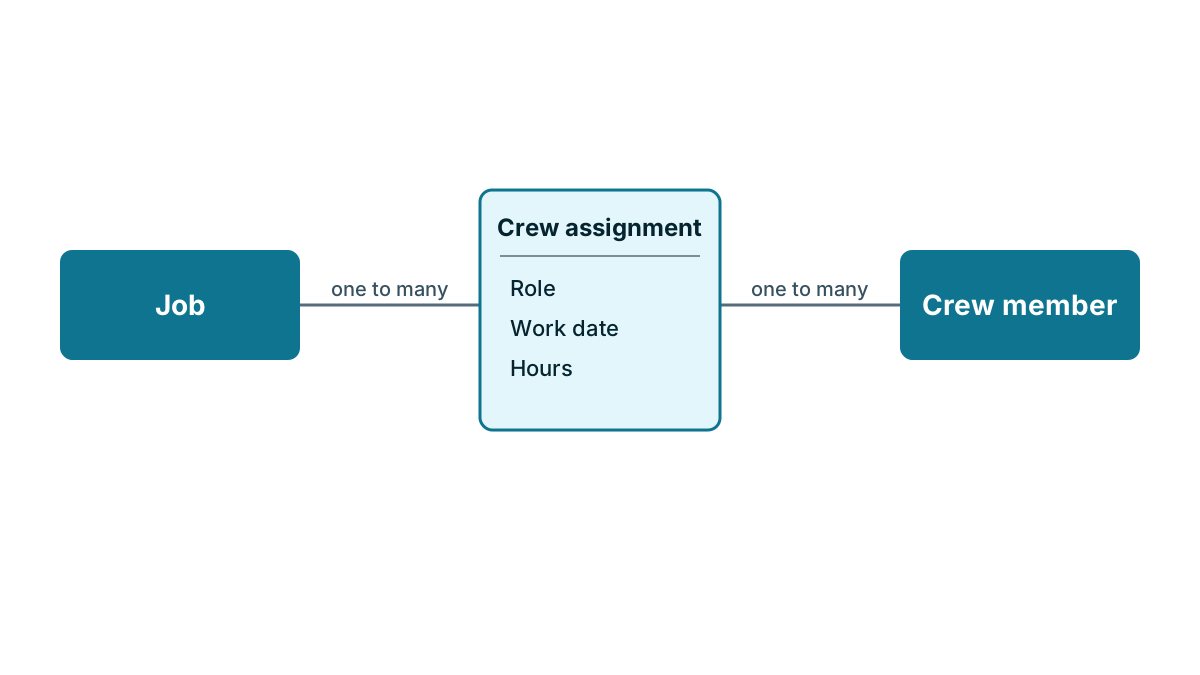
Look at what happened in that picture. The many-to-many link has turned into two one-to-many links. A job has many crew assignments, and a crew member has many crew assignments. Every many-to-many link works like this underneath, even when a CRM hides the record in the middle.
Once you start looking, you'll find these in-between records in most businesses.
| Between | And | The record in between | Facts it holds |
|---|---|---|---|
| Job | Crew member | Crew assignment | Hours, role, work date |
| Order | Product | Order line | Quantity, price on the day |
| Student | Class | Enrollment | Start date, attendance, grade |
| Contact | Property | Property role | Owner, tenant or manager, move-in date |
| Appointment | Service | Booked service | Price charged, who did it |
Give the record in between a name your team already uses. Nobody at the morning meeting talks about junction records. They say shift, booking or line.
If you can't think of a single fact that belongs on the record in between, a plain many-to-many link may be enough, if your CRM offers one. The accountant from the last lesson who looks after four of your customers is a fair example. If all you need is to see who is linked to whom, a simple link will do. If you want to record when she took on each account, you need the record in between.
Never store a list of names in one field
The shortcut everyone tries first is a text field called Crew that says Ana, Marco, Dev. It looks tidy on screen. Then someone asks an ordinary question.
- How many hours did Marco work in May? The field has nowhere to put hours.
- Which jobs has Dev been on this year? A search for Dev also finds every job on Devon Road.
- Marco's legal name is Marcus, and payroll corrects it. Every old job still says Marco.
A list in a field is text, not a link. The CRM can't count it, filter it reliably or follow it back to the person. The same goes for a Products field that says 3 boxes of tile, 2 bags of grout, and a People field on a company holding five names and phone numbers. If you catch yourself typing commas between names, you need a link, and often a record in between.
The lesson on fields later in this chapter warns against numbered fields such as Note 1 and Note 2 for the same reason. Numbered fields and comma lists are both signs that a record is missing.
What happens to child records when you delete a parent?
In a one-to-many link, the one side is the parent and the many side is the child. A company is the parent of its contacts. A quote is the parent of its quote lines. A crew assignment has two parents, the job and the crew member.
Some children can stand on their own. A contact still makes sense if the company record is gone. Others can't. A quote line with no quote is a row of numbers about nothing, and a crew assignment with no job is just some hours.
That difference matters most when someone deletes a parent. A CRM does one of three things, and some let you choose for each link.
- Delete the children too. Delete a quote and its lines go with it. That's right for quote lines. It's a disaster if deleting a company takes three years of contacts and notes with it.
- Leave the children unlinked. The contacts stay, with an empty company link. Nothing is lost, but you end up with orphans that nobody looks after.
- Refuse until the children are moved. The CRM won't delete the company while contacts are linked to it. It's slower, and it's the safest of the three.
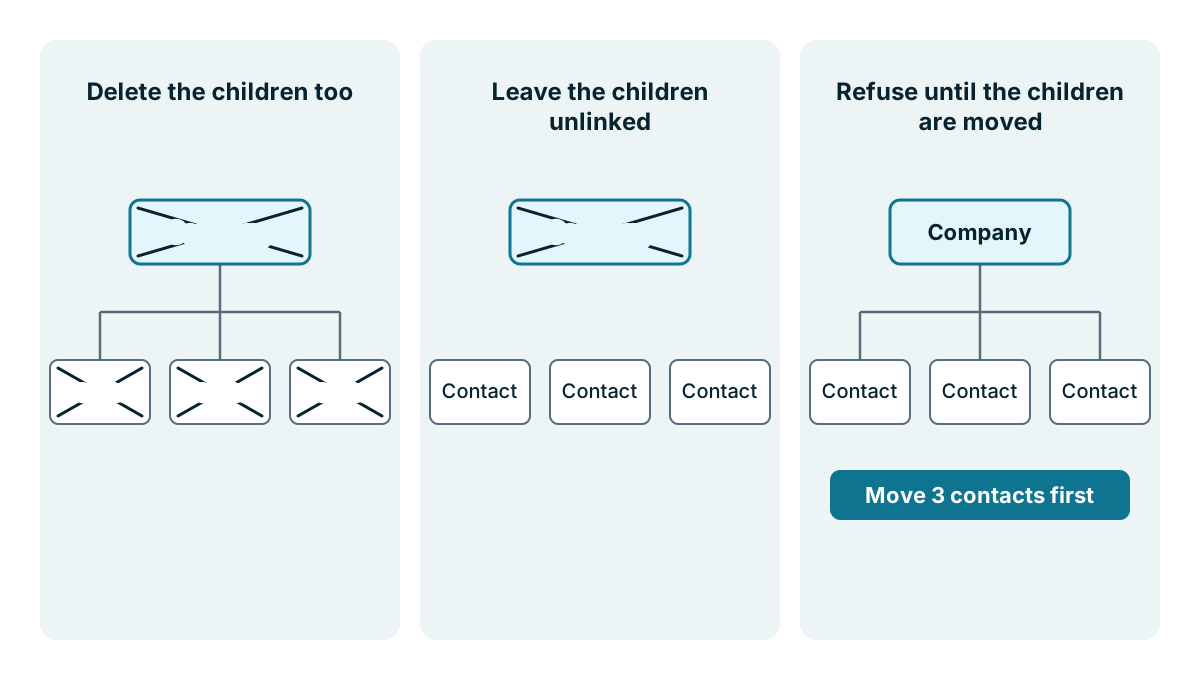
A sensible rule: children that only make sense with their parent, such as quote lines, order lines and crew assignments, should go when the parent goes. Children with a life of their own, such as contacts, deals and jobs, should stay or block the delete.
Watch out
Test this in your trial with dummy records. Make a company with two contacts and a deal, delete the company, and see what's left. Then do the same with a job that has crew assignments. Ten minutes now is better than finding out after someone tidies up old customers in a hurry. Better still, archive old records instead of deleting them, and keep the delete permission to a few people, as the last lesson in this chapter explains.
Key takeaways
- Ask both ways: can one A have many Bs, and can one B have many As? Two yes answers mean many to many.
- A many-to-many link usually needs a record in between, named in your team's words, holding facts about the pair, such as hours on a crew assignment.
- Never type a list of names into one field. If you are typing commas between names, you need a link.
- Know what happens to the children when a parent is deleted, and test it with dummy records before you go live.
Common questions
What does many to many mean in a CRM?
It means each record on one side can link to many on the other side. A crew member can work on many jobs, and a job can need several crew members. Add a record in between when you need to store facts about each pair.
Can a CRM count names typed into a text field?
Not reliably. A list such as Ana, Marco, Dev is text, not a link, so the CRM can't count it, filter it reliably or follow it back to each person. If you catch yourself typing commas between names, you need a link.
Should I delete a company that still has contacts linked to it?
Check first, because CRMs differ. Some delete the children too, some leave them unlinked, and some refuse the delete until the contacts are moved. Test with dummy records, and archive old records instead of deleting them.
Keep your place and test yourself
Enroll for free to save your progress, take the chapter quiz, and get a certificate when you pass every chapter. The lessons stay open to everyone either way.