

Chapter 3: Setting Up Your Data
Data Models for Different Businesses
Four worked models for four very different businesses, what they share, where they differ, and a planner you can use to sketch one for yours.
Lesson 4 of 8 · 8 min read ·
A data model is the map from the earlier lessons: which records you keep, and how they link. It's easier to draw your own once you've seen a few for businesses unlike yours. Here are four. Each is a model a business like that might use, not the one right answer. Read the one closest to you carefully, and skim the others for ideas you can borrow.
All the businesses are invented, and every model is small. None needs more than ten records.
What records does a service trade with repeat visits need?
Picture an HVAC and plumbing firm. It takes repair calls, quotes for replacements, and sells maintenance plans with two visits a year. Most customers are homeowners, with some landlords.
- Customer, the person who calls and pays.
- Property, the address where the work happens.
- Unit, each furnace, boiler or air conditioner, with its model, serial number and install date.
- Service call, one repair job.
- Maintenance plan and Visit, the promise and the work, as in the last lesson.
- Quote with Quote lines, for replacements.
- Invoice with Payments.
A customer owns or rents properties, and a property has units installed. Service calls belong to the customer and happen at a property. Quotes, plans and invoices belong to the customer.
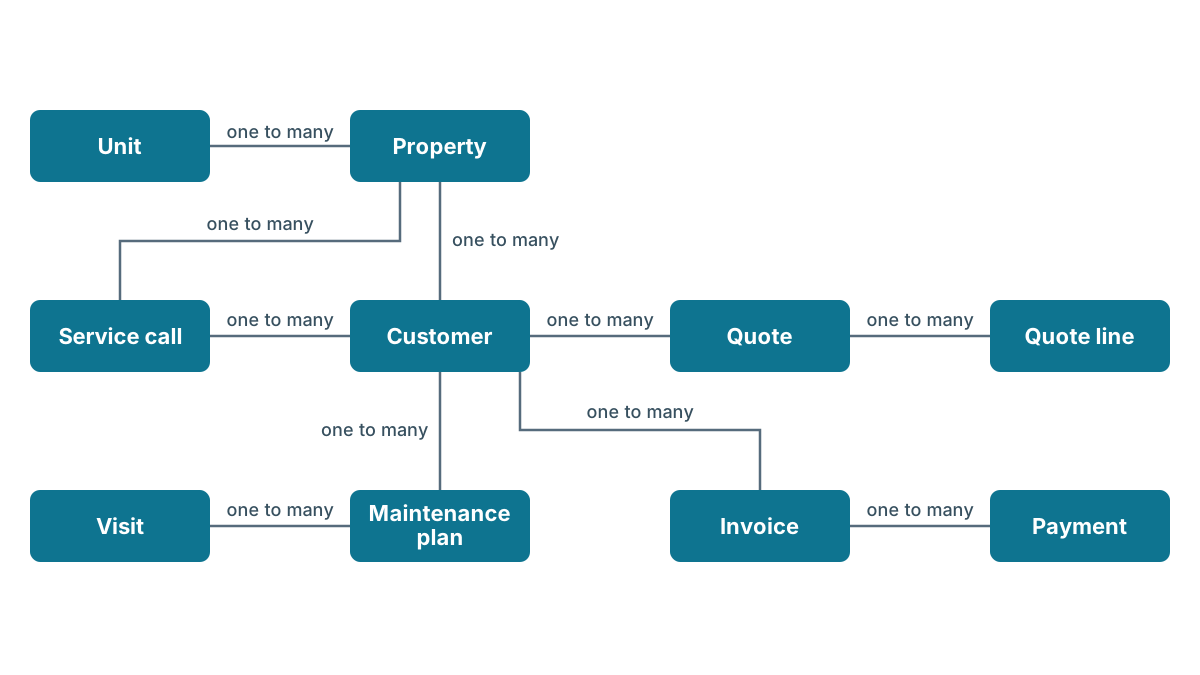
The record that earns its keep here is the unit. When a technician is called to a 15-year-old furnace, the record tells them to bring a replacement quote as well as their tools. Without it, that knowledge lives in one technician's head.
If nearly all your customers have one home, you can drop Property and keep the address on the customer. Add it when landlords start calling.
What records does a project agency need?
Now a small marketing agency. It pitches for work, sends proposals, runs projects that hand over a set of deliverables, and has a few clients on monthly retainers. Everyone tracks hours.
- Client, a company, with its Contacts.
- Opportunity, a possible piece of work, priced in one or more Proposals with Proposal lines.
- Project, the work once it's won.
- Deliverable, each thing the project hands over, with a due date, a status and a count of rounds of changes.
- Team member and Project assignment, the record in between, holding each person's budgeted and logged hours on each project.
- Retainer, the monthly arrangement, with its fee and hours included.
The interesting link is between projects and team members. It's many to many, since a project has several people and each person works on several projects, so the project assignment sits in between. That's where an agency finds out which projects ran over and who was on them.
The retainer gets its own record because it isn't a project. It renews, it has a monthly fee, and it never finishes. Squeeze it into a project and you'll have a project that's been in progress for three years.
What records does a wholesaler with products and orders need?
Next, a wholesale food supplier delivering to restaurants and shops. Customers order most weeks, many pay agreed prices that differ from the list price, and stock has use-by dates.
- Customer, a company, with its Contacts.
- Product, with its price, cost and stock count, bought from a Supplier.
- Order and Order line, the record in between orders and products, with the quantity ordered, the quantity delivered and the price on the day.
- Price agreement, the record in between customers and products, with the agreed price and its start and end dates.
- Lot, each delivery of a product into stock, with its own lot number and use-by date.
- Invoice with Payments.
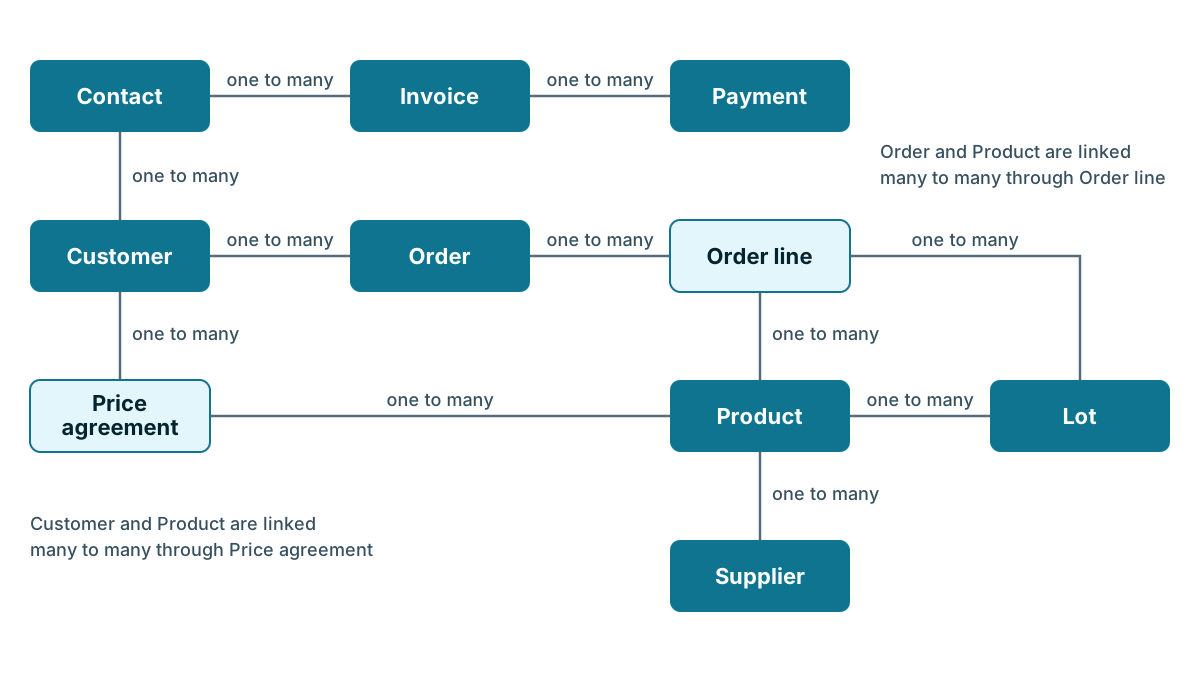
This model has two records in between, and each earns its place. The price agreement stops a price change from rewriting last month's orders. The lot on each order line answers the question every food business dreads: which customers got this batch? Without it, you call everyone.
What records does an appointment business need?
Last, a salon. Clients book appointments, one appointment can hold several services with different staff, and many clients are on a monthly membership.
- Client, a contact. There is no company record at all.
- Appointment, with its time, length and status.
- Service, each item on the menu, with a standard price and length.
- Booked service, the record in between appointments and services, with the price charged and the person who did it.
- Stylist or therapist, the team member.
- Membership, the repeating fee.
A cut with one stylist and a color with another are two booked services in one appointment. The color formula goes on the booked service, not the client, so you keep every past formula. No-show is a status on the appointment, which means you can count no-shows for a couple of months before you decide whether to take deposits.
What the four have in common
Put the four side by side and a pattern shows.
| Business | People, places and things | Activity records | Records in between |
|---|---|---|---|
| Service trade | Customer, Property, Unit | Service call, Maintenance plan, Visit, Quote, Invoice | None needed |
| Agency | Client, Contact, Team member | Opportunity, Proposal, Project, Deliverable, Retainer | Project assignment |
| Wholesaler | Customer, Contact, Product, Supplier | Order, Invoice, Lot | Order line, Price agreement |
| Salon | Client, Stylist or therapist | Appointment, Membership | Booked service |
Every model has a few people, places and things, and a handful of activity records that do the real work. Most have at least one record in between. The differences come almost entirely from what each business does, which is why the last lesson started from activities. Two businesses in the same trade can end up with different models if one sells maintenance plans and the other doesn't.
Try it for your business
The Data Planner below works the same way as this lesson. Pick the business type closest to yours, and it ticks the activities a business like that usually has. Untick what you don't do and tick what you do. It then draws the records and links, and lists the fields worth having on each, with a reason for every one.
Data plan
Commercial cleaning
Made with the Data Planner at CRM School, a free course by Coeffection.
New to this? Learn the key words first (2 minutes)
- Record
- One thing your business keeps track of, such as one customer, one job or one invoice. Records of the same kind share the same fields.For example: The Elm Street roof job is one record. Next week's gutter repair is another.
- Field
- One fact you keep about a record, such as a phone number or a due date. Each field holds one value.For example: A job has a Scheduled date field and a Status field.
- Link
- A connection between two records, so you can click from one to the other. Links are drawn as lines on the diagram.For example: A visit links to the property it happened at.
- One to many
- One record on one side can have many on the other, but each of those belongs to only one. It is the most common kind of link.For example: One customer can have many properties, and each property has one owner on file.
- Many to many
- Records on both sides can have many of the other. Ask both ways, and if both answers are yes, the link is many to many.For example: A roof job needs several crew members, and each crew member works on many roof jobs.
- Record in the middle
- A record that sits between the two sides of a many to many link and joins one of each. It holds facts about the pair. Some tools call it a through record or a junction record.For example: A crew assignment joins Marco to the Elm Street roof and holds his 9 hours.
More terms
- Field type
- The kind of value a field holds, such as text, a date or money. It decides what you can type in and how the CRM can sort, add up or filter it.For example: Quote total is a money field, so the CRM can add up every quote sent in March.
- Parent
- The one side of a one to many link. Its children hang off it.For example: A quote is the parent of its quote lines.
- Child
- The many side of a one to many link. Some children make no sense without their parent, and some can stand on their own.For example: A quote line means nothing without its quote. A contact still makes sense if the company record is gone.
- Crow's foot
- The three short lines at one end of a link on the diagram. They mark the many side.For example: On the line from Customer to Property, the crow's foot sits at Property, because one customer can have many properties.
- Activity
- Something your business does again and again, such as sending quotes or booking appointments. Each activity you tick adds the records it needs.For example: Ticking repeat visits adds a service plan and its visits.
- Status
- A field that says where a record is right now, picked from a short list. If something has its own status, that is a sign it should be its own record.For example: A quote moves from Draft to Sent to Accepted while the customer stays the same.
- Pipeline
- The stages a possible sale moves through, from first contact to won or lost. Each deal sits in one stage at a time.For example: An agency's opportunity moves from Brief to Proposal sent to Won.
- Label
- The few words on a link that say how the two records relate. Read it from the one side to the many side.For example: Customer owns or rents Property.
The field types
- text
- A short line of words, such as a name or a gate code.
- long text
- Several lines of words, such as notes from a visit.
- number
- A plain number you can count or add up, such as hours worked or square feet.
- money
- An amount of money, such as a quote total, so reports can add it up.
- date
- A day on the calendar, such as a renewal date.
- date and time
- A day and a time of day, such as a 2 pm appointment on Friday.
- dropdown
- One choice from a short list you set, such as Draft, Sent or Accepted.
- multi select
- Several choices from a short list you set, such as the services a customer is interested in.
- yes or no
- A box that is ticked or not, such as whether there is a dog on the property.
- An email address, so you can write to the person from the record.
- phone
- A phone number, so your team can call or text from the record.
- address
- A street address, so you can find the place on a map and plan routes.
- link to record
- A connection to another record, such as the customer a job belongs to, so you can click through to it.
- file
- An attached document or photo, such as a signed contract or a photo of the roof.
- user
- A person on your team who logs in, such as the tech assigned to a job.
Plan updated: 10 records for a commercial cleaning.
Step 3. A business like yours might set it up like this
This is a starting point for a commercial cleaning, not the one right answer. Rename, drop and add records to fit how you really work.
Why this step: this is what your CRM would hold. Seeing it drawn lets you spot what is missing before you build anything.
10 records, with repeat service visits and maintenance plans, contracts and e-signature, invoices and payments, multiple sites per customer.
How to read this diagram
- Each box is a record: a kind of thing you keep track of. Here, one Customer and two Properties.
- A line joins two records. The name on the line, like “owns”, says how they are related.
- A short bar on the end of a line means one. This line touches one Customer.
- A three pronged foot means many. This line reaches many Properties.
- Put together: one Customer can own many Properties. Each Property has one Customer.
Read a line from the top record to the one below it, with the name on the line. A bar at one end means one, and a three pronged foot means many. Point at or tab to a record to light its links.
In plain words
The same links as the diagram, written as sentences.
- One Client can have many Contacts. (Link: employs)
- One Client can have many Buildings. (Link: has)
- One Client can have many Service agreements. (Link: signs)
- One Service agreement can have many Cleaning schedules. (Link: sets out)
- One Building can have many Cleaning schedules. (Link: is covered by)
- One Cleaning schedule can have many Cleans. (Link: schedules)
- A Clean can have many Cleaners, and a Cleaner can have many Cleans. A Shift sits between them and records each pairing. (Link: is worked by)
- One Contact can have many Cleaning schedules. (Link: signs up for)
- One Contact can have many Service agreements. (Link: signs)
- One Contact can have many Invoices. (Link: pays)
- One Invoice can have many Payments. (Link: is settled by)
The records and their fields
Client
An organization you sell to. Its people are contacts linked to it.
Why its own record: One company can have many people you deal with. Make it its own record so all of them, and all their work, sit under one name.
- Business name text: A short line of words, such as a name or a gate code.The name on the invoice, spelled one agreed way.
- Main phone phone: A phone number, so your team can call or text from the record.The front desk number, for when your usual contact is away.
- Billing address address: A street address, so you can find the place on a map and plan routes.Where invoices go, which is often not where the work happens.
- Website text: A short line of words, such as a name or a gate code.A quick way to check you have the right business before you call.
- Customer type dropdown: One choice from a short list you set, such as Draft, Sent or Accepted.Lets you count and filter by the kinds of customer you serve.
- Account owner user: A person on your team who logs in, such as the tech assigned to a job.Everyone knows who looks after this customer.
Contact
A person you talk to, buy from or sell to.
Why its own record: A person can call you many times, buy many times and work for a company you also track. One record per person means every call, quote and job links back to the same place.
- First name text: A short line of words, such as a name or a gate code.So you can greet people properly and find them by name.
- Last name text: A short line of words, such as a name or a gate code.Keeps two people called Sam apart in search.
- Phone phone: A phone number, so your team can call or text from the record.The number your team actually calls, one tap from the record.
- Email email: An email address, so you can write to the person from the record.Lets email sync attach messages to the right person.
- Preferred way to reach them dropdown: One choice from a short list you set, such as Draft, Sent or Accepted.Some people never answer the phone. This saves wasted calls.
- Lead source dropdown: One choice from a short list you set, such as Draft, Sent or Accepted.Tells you which kinds of marketing bring in paying customers.
- Billing email email: An email address, so you can write to the person from the record.Invoices often go to someone other than the person you talk to.
Building
A place where you do the work, such as a home, a building or a branch.
Why its own record: One customer can own or rent more than one place, and the work happens at the place. A site record keeps the address and history with the building, even when the owner changes.
- Site name text: A short line of words, such as a name or a gate code.Lets people say which one without reading out the address.
- Address address: A street address, so you can find the place on a map and plan routes.Where the crew drives to, and how you plan routes.
- Access notes long text: Several lines of words, such as notes from a visit.Gate codes, parking and the dog. Saves a call from the driveway.
- Site type dropdown: One choice from a short list you set, such as Draft, Sent or Accepted.Lets you count homes, offices or shops separately.
- Active yes or no: A box that is ticked or not, such as whether there is a dog on the property.Hides places you no longer serve without losing their history.
- Site contact phone phone: A phone number, so your team can call or text from the record.The person on site is rarely the person who pays.
- Floor area number: A plain number you can count or add up, such as hours worked or square feet.Cleaning time and price are set by area.
- Alarm and key notes long text: Several lines of words, such as notes from a visit.Night crews need to get in without calling the client.
Service agreement
A signed agreement with its own dates, status and signed copy.
Why its own record: A contract has its own start date, end date and signed copy. As fields on the company, the first renewal would type over the old dates.
- Contract title text: A short line of words, such as a name or a gate code.Says what the agreement covers, in a word or two.
- Contract status dropdown: One choice from a short list you set, such as Draft, Sent or Accepted.Draft, sent, signed, expired or ended. Shows which ones are waiting on a signature.
- Sent for signature date: A day on the calendar, such as a renewal date.Lets you chase unsigned contracts after a few days.
- Signed date date: A day on the calendar, such as a renewal date.The day it became binding.
- Start date date: A day on the calendar, such as a renewal date.When the work or service begins.
- End date date: A day on the calendar, such as a renewal date.Sort by it to see what needs renewing.
- Signed copy file: An attached document or photo, such as a signed contract or a photo of the roof.The signed document, on the record, when someone asks what was agreed.
- Signer email email: An email address, so you can write to the person from the record.Where the signing request goes, which may not be your usual contact.
Cleaning schedule
A promise of repeat work, such as a maintenance plan. Each visit it creates is its own record.
Why its own record: The plan is the promise of repeat work, with its own start date, renewal date and price. It stays put while the visits come and go, so it is a record of its own.
- Plan type dropdown: One choice from a short list you set, such as Draft, Sent or Accepted.Lets you count customers on each level of plan.
- Start date date: A day on the calendar, such as a renewal date.Sets the cycle of visits and the renewal date.
- Renewal date date: A day on the calendar, such as a renewal date.Gives you a list of plans to renew each month.
- Visits per year number: A plain number you can count or add up, such as hours worked or square feet.Tells you how many visits to book, and how many are still owed.
- Plan price money: An amount of money, such as a quote total, so reports can add it up.Lets you add up the repeat income you can count on.
- Plan status dropdown: One choice from a short list you set, such as Draft, Sent or Accepted.Active, paused or cancelled. A cancelled plan should stop creating visits.
- Days of the week multi select: Several choices from a short list you set, such as the services a customer is interested in.Sets which nights the building is cleaned.
- Scope long text: Several lines of words, such as notes from a visit.What is and is not included, so there is no argument about windows.
Clean
One time you go back, with its own date and outcome.
Why its own record: Each visit has its own date, who went and what they found. A Last service date field would type over that history every time.
- Visit date date: A day on the calendar, such as a renewal date.Puts the visit on the schedule and shows when you were last there.
- Visit status dropdown: One choice from a short list you set, such as Draft, Sent or Accepted.Scheduled, done, missed or moved. Missed visits are the ones customers remember.
- Visited by user: A person on your team who logs in, such as the tech assigned to a job.Shows who to ask about what they found.
- Findings long text: Several lines of words, such as notes from a visit.What was checked and what was wrong, kept for the next visit.
- Follow-up needed yes or no: A box that is ticked or not, such as whether there is a dog on the property.Turns findings into a list of quotes to send.
- Quality check score number: A plain number you can count or add up, such as hours worked or square feet.Spot checks turn into a trend you can show the client.
Cleaner
Someone who does the work. Keep them as records when you need to link them to jobs, visits or bookings.
Why its own record: One person works on many jobs, visits or bookings. A record for each person lets you see all their work and hours in one place.
- Full name text: A short line of words, such as a name or a gate code.The name customers and colleagues use.
- Team role dropdown: One choice from a short list you set, such as Draft, Sent or Accepted.Lets you plan work by who can do what.
- Mobile phone: A phone number, so your team can call or text from the record.For changes to the day's plan.
- Skills multi select: Several choices from a short list you set, such as the services a customer is interested in.Lets you find who is qualified for a job before you book it.
- Active yes or no: A box that is ticked or not, such as whether there is a dog on the property.Keeps past staff on old records without offering them for new work.
Shift
One person on one piece of work. It sits between the work and the team and holds facts about the pairing.
Why its own record: Marco worked 9 hours on the Elm Street roof. Those hours belong to Marco on that job, not to Marco or the job alone, so this record sits in the middle and holds them.
- Role dropdown: One choice from a short list you set, such as Draft, Sent or Accepted.Lead, helper or specialist. The same person has different roles on different work.
- Work date date: A day on the calendar, such as a renewal date.Multi-day work has different people on different days.
- Hours number: A plain number you can count or add up, such as hours worked or square feet.Hours belong to this person on this work, not to either one alone.
- Hourly cost money: An amount of money, such as a quote total, so reports can add it up.Lets you see what the labor on each piece of work really cost.
- Notes long text: Several lines of words, such as notes from a visit.Anything about this person's part, such as who left early and why.
- Clock in date and time: A day and a time of day, such as a 2 pm appointment on Friday.Start times belong to the shift, not the cleaner or the clean.
- Clock out date and time: A day and a time of day, such as a 2 pm appointment on Friday.Lets you compare actual hours with what the schedule allowed.
Invoice
A bill you send, with its own number, due date and status.
Why its own record: A customer gets many invoices, each with its own number, due date and status. That is how you see which ones are overdue.
- Invoice number text: A short line of words, such as a name or a gate code.Matches the number in your accounting software.
- Issue date date: A day on the calendar, such as a renewal date.Starts the clock on payment terms.
- Due date date: A day on the calendar, such as a renewal date.Lets you list what is overdue.
- Invoice total money: An amount of money, such as a quote total, so reports can add it up.The amount billed, including tax.
- Invoice status dropdown: One choice from a short list you set, such as Draft, Sent or Accepted.Sent, part paid, paid or overdue. Shows who needs a reminder.
- Balance due money: An amount of money, such as a quote total, so reports can add it up.What is still owed after any payments.
Payment
Money received against an invoice. One invoice can have several, such as a deposit and a final payment.
Why its own record: One invoice can be paid in parts, such as a deposit and a final payment. A record per payment shows what came in and when.
- Payment date date: A day on the calendar, such as a renewal date.Shows when the money arrived.
- Amount money: An amount of money, such as a quote total, so reports can add it up.Part payments add up to the invoice total.
- Method dropdown: One choice from a short list you set, such as Draft, Sent or Accepted.Card, bank transfer or check. Helps when matching to the bank.
- Reference text: A short line of words, such as a name or a gate code.The bank or card reference, for when a payment is disputed.
Notes
- Scope and price usually differ by building, so give each building its own cleaning schedule under the client's agreement.
- Complaints are worth tracking as their own records once you get more than a few a month. Tick Support cases to add them.
- If cleaners are not CRM users, keep them as Cleaner records so shifts can link to them.
What to do next
- Check it against how you really work. Walk through a recent customer, from first contact to payment. Is there a record for every step?
- Pick the fields you will truly fill in. Keep the ones your team will enter every time and drop the rest. You can always add more later.
- Build it in your CRM, starting with the top record. Create the record at the top of the diagram first, then the ones below it, then the links.
Lessons that help
- How Records Link for one to many, many to many and the record in the middle
- Plan Records Around What You Do for which things deserve their own record
- Data Models for Different Businesses for four worked examples to compare with yours
- Fields Worth Having and Fields to Skip for choosing fields your team will really fill in
Enroll free to save plans and email them to yourself.
Open this plan on its own page to share or bookmark it.
Treat the result as a first draft. It shows how a business like yours might set things up, not the one right answer. Rename the records to the words your team uses, cross out anything you can't name a weekly use for, and then do the test from the first lesson in this chapter: take your three messiest real customers and check that each one fits.
Tip
Start with fewer activities ticked, not more. It's easy to add a record type once you need it, and hard to take one away after your team has filled it in for a year.
Key takeaways
- Very different businesses end up with small models, usually six to ten records.
- Each model has people and places, activity records and often a record in between. What differs is the activities.
- Look for the record that earns its keep in your business, such as a unit, a lot or a booked service.
- Use the Data Planner for a first draft, then rename, trim and test it against your messiest customers.
Common questions
Do I have to copy one of these four models?
No. These are invented examples, not the one right answer. Treat your first draft as a starting point, then rename, trim and test it against your messiest customers.
How many records does a small business CRM need?
Very different businesses usually end up with six to ten records. Most models have people and places, a handful of activity records, and often a record in between.
What does a record in between do?
It sits between two records that link many to many. A booked service joins an appointment to a service, and holds the price charged and who did the work.
Keep your place and test yourself
Enroll for free to save your progress, take the chapter quiz, and get a certificate when you pass every chapter. The lessons stay open to everyone either way.