

Chapter 12: Keeping It Healthy
Keeping Data Clean
Data goes bad slowly and on its own. Here are the four kinds of mess, how to stop most of it at the door, and a monthly hour that deals with the rest.
Lesson 1 of 6 · 6 min read ·
Even a perfect import starts to decay the day it lands. People change jobs. Companies move or close. Someone types a contact in a hurry, and now there are two of her. Nobody did anything wrong, but a year later your search results are full of doubles and your reminders go to people who left.
Clean data doesn't need a big project. It needs a small amount of prevention and a small, regular amount of care, in the same way a van needs oil changes rather than a new engine.
What are the four kinds of data mess?
Naming each kind of mess makes it easier to spot and fix.
Duplicates. The same person or company appears twice. Their history gets split, and two people may call the same customer.
Stale records. The information was right once. The contact has left, the number has changed, the deal died months ago.
Gaps. Key details are missing, such as a lead source or a phone number.
Inconsistency. The same thing gets written different ways: TX, Tex and Texas, or Acme Ltd and ACME Limited. Filters and reports then miss records without warning.
Each kind has a cheap way to prevent it and a slower way to fix it.
| Problem | How to prevent it | How to fix it |
|---|---|---|
| Duplicates | Search before you create | Merge them, one pair at a time |
| Stale records | Update when you hear news | Review records with no recent activity |
| Gaps | Require only what people always know | Fill in key records, and ignore the rest |
| Inconsistency | Use drop-down lists, not free text | Bulk-update to one spelling |
How do you stop mess at the door?
Prevention costs a fraction of what cleanup costs, so start there. Most mess comes in through a few doors.
- Drop-downs for anything you'll report on. Lead source, industry and state should come from a fixed list wherever possible.
- Duplicate warnings. Many CRMs warn you when a new record looks like an existing one. Turn this on if yours has it.
- Web forms. Forms create records without a person checking them. Use a required email field, and spam protection if your form offers it.
- Imports. Every list you import is a chance to bring in a mess. Run your old checks on any new list, and tag the batch.
- Clear ownership. Decide who can add new picklist values. If everyone can, you will soon have 40 lead sources.
The monthly data hour
Put one hour in the calendar each month. It's a small commitment, and it stops the job from ever getting big. Follow the same order each time.
- Merge duplicates. Run your CRM's duplicate report if it has one. If not, sort by email or company name and scan.
- Check bounced emails. Each bounce usually means a person has moved. Find out who took their place.
- Review stale contacts. Pick those with no activity in a year. Mark them inactive or check whether they're still there.
- Tidy the lists. Look at your drop-down values and fix any strays.
- Fill the top gaps. Choose your best 20 customers and make sure their records are complete.

Example
An invented example. A dental lab has 18 staff and sells to about 200 dental practices. Dentists retire, practices merge, and front desk staff change often. The lab's office manager takes the first Tuesday of each month for her data hour.
In a typical month, she merges a few duplicates and updates contacts after two bounced emails. She also picks up what the delivery drivers hear. They're often the first to learn that a practice is changing hands, so she gave them a one-line habit: tell the office and it goes in the record. That news is often worth more than any report.
How do you merge duplicates safely?
Merging joins two records into one, and it often can't be undone. Before you merge, look at both records and decide which holds the better details. Check whether the two are really the same. Two people called John Smith at the same company could be a father and son.
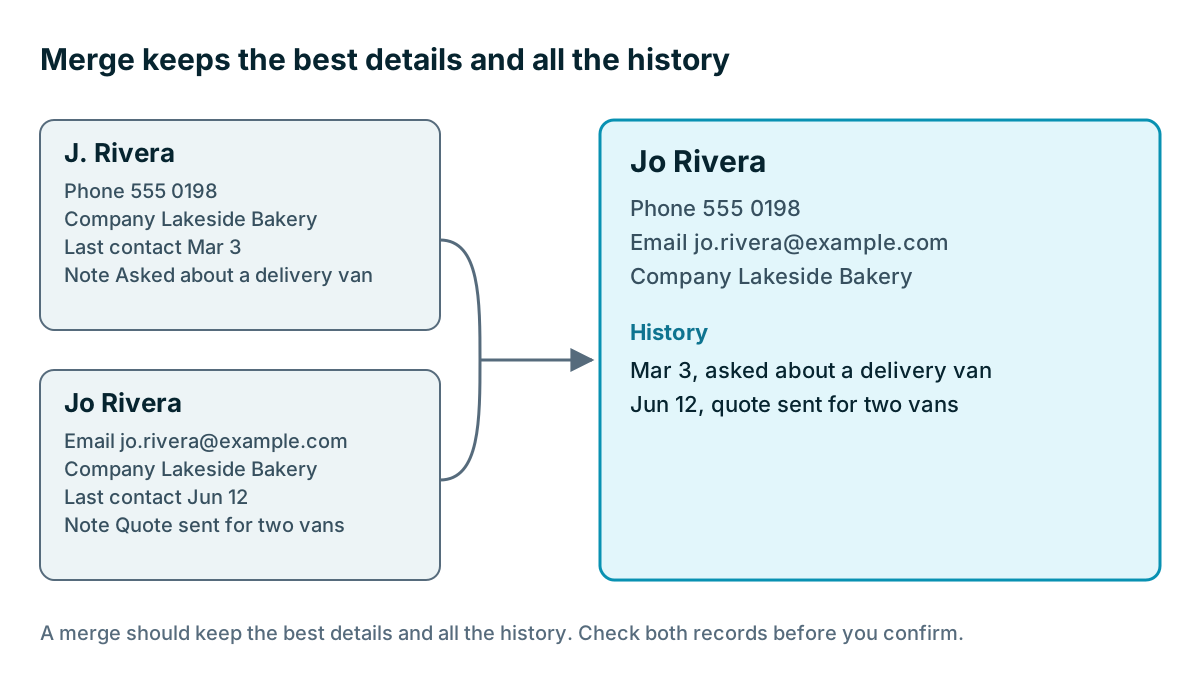
Don't bulk-merge a large list without testing a few first. An automatic merge on a shared office phone number or a general company inbox could join people who have nothing to do with each other.
Watch out
Be careful with mass updates of any kind. Before you run one, export the records you're about to change, so that you have a way back. One mistaken bulk edit can overwrite a field on thousands of records in a few seconds.
Give it an owner
Data that belongs to everyone belongs to no one. Name one person as your data owner. In a small business this is a few hours a month on top of another job, usually for someone in the office who likes things tidy. Their job is to run the monthly hour, keep the drop-down lists in shape, and raise issues with the team.
Everyone else still has a part to play. The person closest to the customer is the one who hears that a contact has left. Ask them to update it on the spot, and thank them when they do.
Does your data need to be perfect?
Clean doesn't mean perfect, and you can spend a lot of time polishing records that don't matter. Focus on what your business uses. Active customers and open deals deserve care. A cold lead from four years ago doesn't. If you're not using a field, or you never contact a group of records, the better fix may be to remove them. We looked at that when we covered your archive, and the same thinking applies here.
There's also a privacy reason to delete. Holding personal data with no purpose carries risk, and rules in many places expect you to keep it no longer than you need. If someone asks to be removed, have a simple process, and do it. Check which rules apply to your business.
A useful test is the one from the first chapter: when someone looks up a customer, can they trust what they see? If the answer is mostly yes, your data is healthy enough.
- Name a data owner
- Put a monthly data hour in the calendar
- Turn on duplicate warnings if your CRM has them
- Replace free text with drop-downs for key report fields
- Decide who may add new list values
- Export before any bulk change
Key takeaways
- Data decays on its own, through duplicates, stale records, gaps and inconsistency.
- Prevention is cheap: search first, use drop-downs, and control how records come in.
- One regular data hour a month keeps the cleanup small.
- Check before you merge, and export before any bulk change.
- Name a data owner, and focus on the records your business uses.
Common questions
How do duplicate contacts get into a CRM?
Often someone types a contact in a hurry, and imports can bring in mess too. Search before you create a record, and turn on duplicate warnings if your CRM has them.
How often should I clean up CRM data?
Set aside one hour a month and follow the same order each time. A small regular habit keeps the job from ever getting big.
Should I delete old records from my CRM?
It may be the right move. If nobody uses a record or field, removing it can be the better fix. Check which privacy rules apply to your business first.
Keep your place and test yourself
Enroll for free to save your progress, take the chapter quiz, and get a certificate when you pass every chapter. The lessons stay open to everyone either way.