

Chapter 12: Keeping It Healthy
Watching Costs as You Grow
CRM bills rarely jump all at once. They creep up through seats, tiers, add-ons and renewals. Here is how to see the real figure and act before the renewal date.
Lesson 3 of 6 · 6 min read ·
Nobody signs up for a CRM expecting the bill to triple. It tends to happen one sensible step at a time. You hire two people, so you add two seats. Someone needs a feature, so you move up a tier. A phone add-on seems reasonable. The renewal comes, and the first-year discount ends. Each step made sense, but nobody added them up.
In Chapter 2 you worked out the true cost before you bought. This lesson is about keeping that sum current after you've bought. It takes a couple of hours a year.
What makes a CRM bill grow?
Seats. Adding people is the most obvious way costs grow. New hires need logins, and leavers often keep theirs because nobody closed them.
Tier jumps. One new need can move the whole team to a higher plan. Under per-seat pricing, that lifts the price of every seat, including those of people who don't need the feature.
Add-ons. Extra features sold separately tend to arrive one at a time and rarely leave.
Usage limits. Contacts, emails, storage, automation runs and AI credits can all push you past a limit. Some products charge for going over, and others make you buy the next level up.
Renewal changes. First-year discounts end, and list prices can rise. Check what the second-year price will be, as we said in Chapter 2.
An invented example
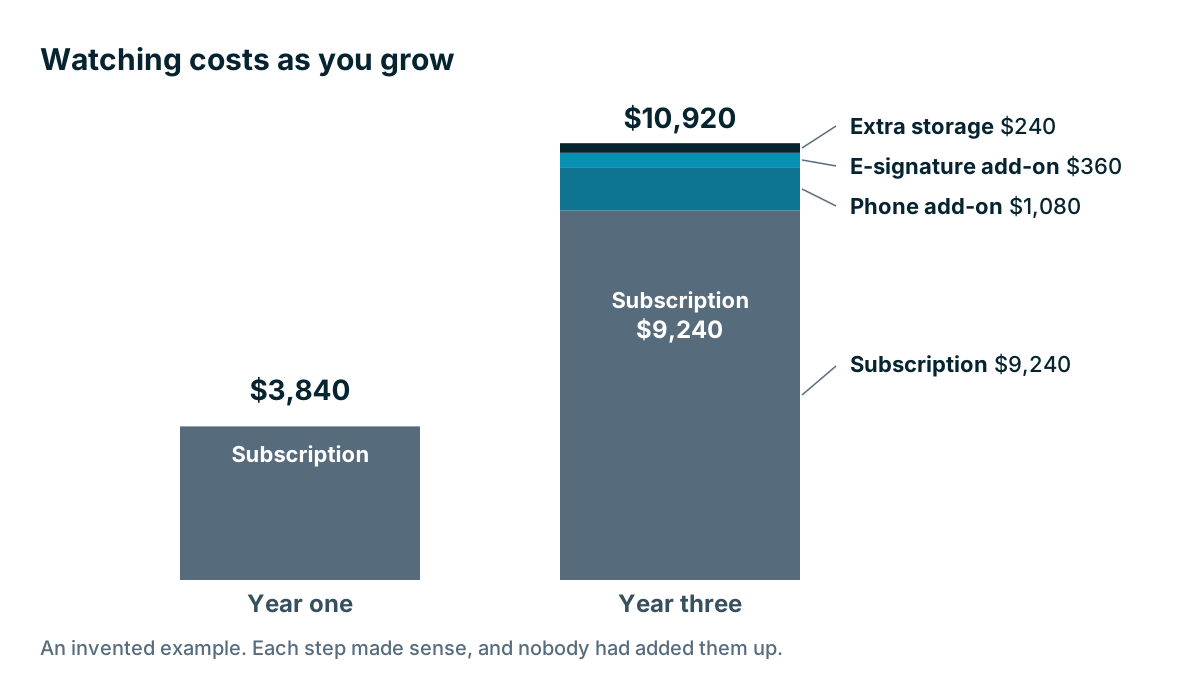
A catering company has grown over three years. These prices are made up to show the method, and the product is invented.
| Line | Year one | Year three |
|---|---|---|
| Seats | 8 | 14 |
| Price per seat per month | $40 | $55, after a tier change |
| Subscription for 12 months | $3,840 | $9,240 |
| E-signature add-on, $30 a month | Not bought | $360 |
| Extra storage, $20 a month | Not bought | $240 |
| Phone add-on, $15 a month for 6 users | Not bought | $1,080 |
| Total | $3,840 | $10,920 |
The bill has almost tripled, but the team has not quite doubled. The owner sits down with the invoice and a list of users, and finds three things.
Three of the 14 seats belong to people who left or never log in. At $55 a month, that's $1,980 a year. The storage add-on was bought for a one-off project that ended. That's another $240. And only one team member actually needed the feature that drove the tier change. A little research suggests a cheaper separate tool could do that one job.
The first two fixes alone take $2,220 off next year's bill, with no effect on anyone's work. The third needs more thought, and it's a discussion worth having before renewal.
How do you review your CRM cost each year?
Schedule the review about 90 days before your renewal date, so you have time to act. If you're on a monthly plan, pick a fixed date each year. Pull your invoices and your user list, and go through these questions.
- What did we pay in the last 12 months, in total?
- What will the next 12 months cost at renewal prices?
- How many seats do we pay for, and how many are in real use?
- Which add-ons did we use in the last 90 days?
- How close are we to each plan limit?
- Which feature is keeping us on this tier? Who uses it?
- When is the notice deadline for cancelling or changing?
Put the answers on one page and keep it with your decision note from Chapter 2. Comparing it with last year's page is the quickest way to see what's changed.
Is the CRM still worth what it costs?
A bigger bill is not a problem if the CRM is earning it. Go back to the sum from Chapter 1. Is the value still well above the cost? A catering company that's doubled its revenue may be happy with that bill. Two things are worth tracking:
- Total cost as a share of revenue, or per employee. This shows whether it's growing faster than the business is.
- Cost per active user. Divide the yearly total by people who really use it. A high number can point to unused seats or add-ons nobody needs.
Compare with your own past figures. We won't give you a typical percentage, because any figure would depend heavily on your trade and your size.

Know your levers
Once you know where the money goes, you have several options. Try them in this order.
- Remove what you don't use. Spare seats and idle add-ons are the easiest savings. Check whether your contract lets you cut seats mid-term, because some only allow it at renewal.
- Check your seat mix. Some products offer cheaper read-only or light-use seats. These can suit people who only look things up.
- Ask about the annual price. If you're sure you're staying, paying yearly may cost less. Weigh that against the flexibility you give up, as we covered in Chapter 2.
- Ask for a better deal. At renewal, it's fair to ask. Be polite and specific: we have 11 active users, here's our budget, what can you do? The answer may be no, and that's fine.
- Replace one expensive add-on. A separate tool may do that one job for less, though each extra tool adds its own login, its own bill and one more integration to maintain.
Watch out
Watch for the notice deadline. A contract that renews by itself may need written notice 30, 60 or 90 days ahead, depending on the vendor. Miss that date and you may be locked in for another year at the new price. Put the deadline in your calendar with a reminder a month before it.
What happens when you outgrow your plan?
Costs often jump at a point you can see coming. Before you grow past a limit, find out what the next level costs. If you're about to go from 19 to 25 people, or to double your contact count, look at the pricing page and your plan's limits first.
This also protects you from a surprise in the middle of a busy season. It may affect your budget, or it may change how you structure your seats. It's much better to find out early than from an invoice.
Tip
Give one person responsibility for the CRM bill, with a calendar reminder and a short note of what was bought and why. Add-ons often stay on for years because nobody remembers who asked for them.
Key takeaways
- Costs grow through seats, tier jumps, add-ons, usage limits and renewal changes.
- Do a yearly review about 90 days before renewal, using invoices and the user list.
- Remove unused seats and add-ons first, since they are the easiest savings.
- Judge the bill against value, using your own past figures.
- Know your notice deadline, and check the next level's cost before you grow past a limit.
Common questions
Why did my CRM bill go up so much?
It usually crept up through extra seats, a higher tier, add-ons and a first-year discount that ended. Each step seemed sensible, but nobody added them up.
How often should I review my CRM costs?
Once a year, about 90 days before your renewal date. Pull your invoices and your user list, and check how many seats are really in use.
Can I cut seats or add-ons before renewal?
Check your contract first. Some vendors let you cut seats mid-term, while others only allow it at renewal. Removing unused seats and add-ons is usually the easiest saving.
Keep your place and test yourself
Enroll for free to save your progress, take the chapter quiz, and get a certificate when you pass every chapter. The lessons stay open to everyone either way.