

Chapter 12: Keeping It Healthy
Backups and Your Exit Plan
A vendor backs up its systems for its own reasons, not to undo your mistakes. Here is how to keep your own copy, check it works, and write a one-page exit plan.
Lesson 5 of 6 · 6 min read ·
In Chapter 2 you tested the export before you bought and promised yourself a regular backup. Most people mean to do this. Few get around to it, because nothing bad has happened yet. This lesson makes it into a routine that takes minutes a quarter.
Why aren't the vendor's backups enough?
Serious cloud vendors keep backups of their systems. Those backups exist mainly to recover the vendor's own service after a failure. They may not help you if a teammate deletes 800 contacts by mistake, a bad import overwrites a field, or a connected app scrambles your phone numbers.
Before you rely on the vendor, ask these questions and get the answers in writing.
- Can you restore my data if we delete it by mistake?
- Can you restore one record, or only the whole account?
- How far back can you go?
- Is there a fee for a restore?
- How long does a restore take?
- Is there a recycle bin for deleted records, and how long does it keep them?
The answers vary a lot by vendor and plan. Some will restore on request, some charge for it, and some can't help at all. Your own copy means you don't need to depend on any of those answers.
What should a CRM backup include?
A backup is more than your contact list. If the worst happened, what would you need to rebuild?
| Part | Why it matters | How to save it |
|---|---|---|
| Contacts and companies | Your customer list | CSV export |
| Deals and quotes | Your money in progress | CSV export |
| Notes and activities | The history that makes records useful | CSV export, if your plan offers it |
| Custom fields | Your own data | Check they appear in the export |
| Attachments | Contracts, photos and quotes | Bulk download, or keep originals elsewhere |
| Your setup | Stages, fields, roles and automations | A written note or screenshots |
The last row often gets missed. An export gives you data. It doesn't tell you how your system was built. A short document listing your stages, your fields and your automations makes a rebuild far easier, in the same system or in a new one.
Check for the links between records too. Exports should have the ID columns from the migration lesson, so that each note can still be tied to its customer.
The quarterly backup loop
Four steps, every three months. The second one is what most people skip.
- Export. Run a full export of every record type.
- Open and check. Open the files. Are the row counts about right? Are the newest records there? Do notes still point to customers?
- Store safely. Save the files in a dated folder, away from the CRM, with access limited to a few people.
- Delete the oldest. Keep the last four, and securely remove anything older.
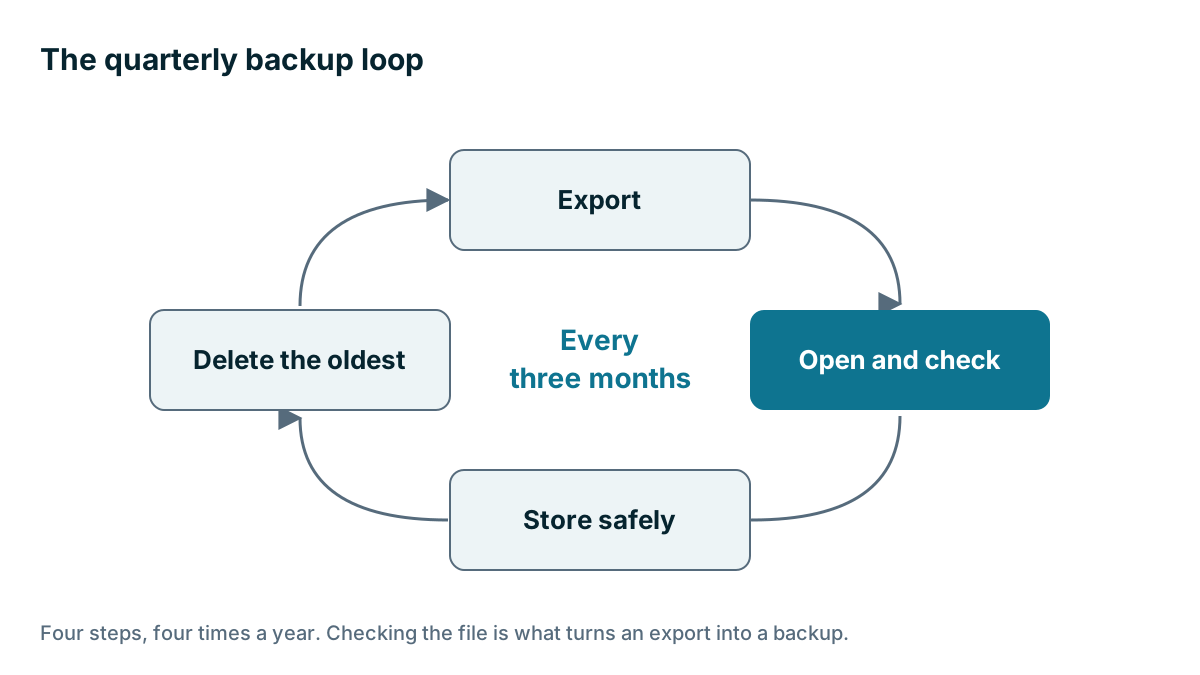
An export you haven't opened isn't a backup. It's a file you hope is one. Some teams find out what's wrong with their export only on the day they need it.
Watch out
A backup file is a complete copy of your customer list, with none of the CRM's protections around it. Don't leave it on a laptop, in a shared folder everyone can open, or in an email attachment. Use encrypted storage with a short list of people who can reach it, and delete old copies on schedule. A forgotten export can do more damage than the problem it was meant to solve.
Some vendors and third parties offer automated backup tools. These can be worth it if your data changes quickly. Check that the tool covers what you need, how it stores your data, and whether you've tested restoring from it.
How do you check that a backup works?
Once a year, try to use your backup. You don't need to rebuild everything. Take ten records from the last backup and pretend you lost them. Can you find them in the file? Could you re-import them, with the links intact? How long would that take? This is good practice for the person who'd have to do it, and it often shows up a gap.

Example
An invented example. A contract upholstery workshop serves hotels and restaurants, and has 16 staff. The owner sets a calendar reminder for the first week of each quarter. In the second quarter, his check shows the notes file is much smaller than last time. A plan change had quietly removed notes from the standard export. He finds it within minutes and raises it with the vendor. If he hadn't opened the file, he'd have found out at the worst possible moment.
Write a one-page exit plan
A one-page exit plan turns a possible crisis into a known task. You won't need it most years. If your vendor raises prices sharply, gets bought, drops a feature or closes down, you'll be glad it exists. Write it once, and update it each year.
- Our contract ends on this date, with this notice period
- This person owns the vendor account and holds the admin login
- Here's how we get a full export, and who knows how
- Here's where our latest backup lives
- Here's how we get attachments out
- These tools connect to the CRM and would need changing
- These automations and templates would need rebuilding
- These are the two products we'd look at first
- This is how long the vendor keeps our data after we cancel
The line about the admin login matters more than it looks. If the only person with admin access leaves, or you've paid through a consultant's account, an exit can get difficult. Make sure the business owns the account, in the business's name, with a shared company email rather than one person's address.
You should also keep an eye on your vendor's health. Pay attention to announcements about ownership, price changes and features being retired. Read the emails from your vendor that look boring. This doesn't require suspicion, just attention.
How do you make leaving easier?
Small choices make leaving easier. Keep important documents stored somewhere other than the CRM as well. Avoid building critical processes on a feature only one vendor has, unless it's worth it. Use plain names for fields and stages. Keep your automations few, and keep them written down. Each of these keeps you free to stay because you want to, not because leaving is too hard. That's the best position to be in with any vendor, including us.
Key takeaways
- A vendor's backups exist mainly for its own recovery. Ask what it can do for you, and get the answer in writing.
- A full backup covers data, history, attachments and a written note of your setup.
- Export every quarter, open the files, store them safely and delete the oldest.
- A backup file is your whole customer list, so protect it.
- Keep a one-page exit plan, and make sure the business owns the admin account.
Common questions
Does my CRM vendor back up my data?
Serious cloud vendors keep backups, mainly to recover their own service after a failure. Ask whether they can restore your deleted data, how far back they go and what a restore costs, and get the answers in writing.
What should a CRM backup include?
Contacts, companies, deals, quotes, custom fields and attachments, plus notes where your plan allows. Keep a written note or screenshots of your stages, fields, roles and automations, since an export doesn't show how the system was built.
How often should I back up my CRM?
Every three months, export every record type, open the files to check them, and store them safely. Opening the file is the step most people skip, and it's what turns an export into a backup.
Keep your place and test yourself
Enroll for free to save your progress, take the chapter quiz, and get a certificate when you pass every chapter. The lessons stay open to everyone either way.