

Chapter 12: Keeping It Healthy
When It's Time to Change Systems
Sometimes the CRM really is the problem, and often it isn't. Here is how to tell the difference, what to fix first, and how to make the call.
Lesson 6 of 6 · 6 min read ·
Sooner or later, someone on your team will say the CRM is terrible and you should replace it. Sometimes they're right. Often the real trouble is bad data, unclear rules or a setup that's grown out of hand, and those will follow you to the next system.
Moving is expensive. You've seen what it takes: planning, cleaning, mapping, testing, cutover, retraining and a slow first month. Don't pay that cost to fix a problem a new system won't fix. Equally, don't stay for years out of fear of moving, while your team works around a tool that no longer fits.
How do you tell a tool problem from a team problem?
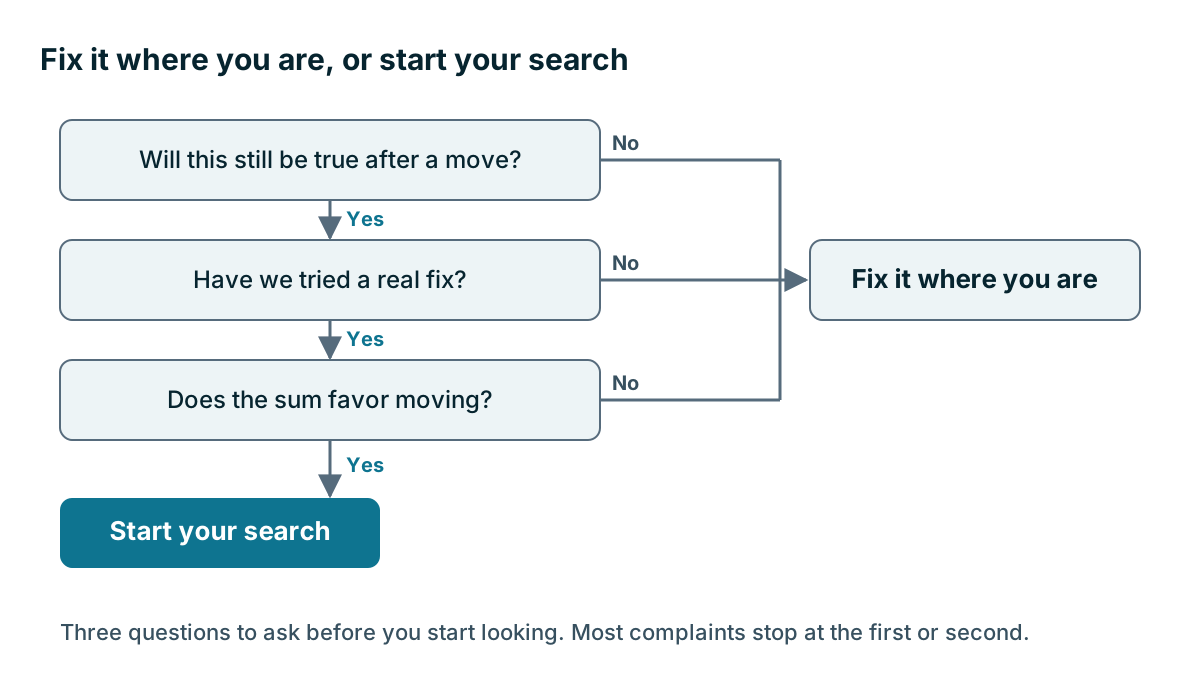
Start by asking what would still be true after a move. If your rules aren't followed today, will they be followed in a new product? If your data is messy, moving it will carry the mess with it. If your managers don't use the system, they won't use the next one either.
| What you notice | Try this first | Consider moving if |
|---|---|---|
| Nobody updates it | The rules and manager habits from Chapter 10 | They're solid, and it's still too slow to use |
| Search results are a mess | A data cleanup | Duplicate tools are too weak to keep it clean |
| It feels too complicated | Remove fields and automations | It's still hard after you've cut it back |
| The bill keeps rising | A cost review | The price no longer matches the value at any tier |
| It can't do something we need | Check settings, add-ons and integrations | A must-have can't be met any reasonable way |
| Reports can't be trusted | Check how the data is entered | Good data still can't give you the report |
What signs mean the tool really is the problem?
Some problems really do come from the system, and the signs below are good reasons to look around.
Your business has changed shape. You've added a branch, a new line of work or a very different way of selling, and the system can't represent it. A plumber with four vans and a plumbing contractor with 40 staff and three divisions need different tools. The reverse happens too. A business that shrinks may be paying for far more than it uses.
You've hit a hard limit. You've reached a real ceiling on records, pipelines, permissions or integrations, and the vendor has no route past it.
A must-have has gone. The vendor retired a feature you depend on, or a connection you rely on stopped working and won't be fixed.
The workarounds are costing more than a move. Someone spends hours a week re-keying data or stitching reports in a spreadsheet. Add up those hours and put a price on them.
You can't get support. Problems sit unanswered and bugs stay open, and your business pays for that.
You no longer trust the vendor. Sharp price rises, poor security practice or a change of ownership that alters the product can all be good reasons, particularly if the contract terms have changed.
Try a real fix first
Before you decide, give the current system one fair chance. Set a period of 60 to 90 days with a clear goal. Cut fields, clean the data, and call the vendor. Tell your account contact what's wrong, because vendors often know about a setting or a plan that helps. Some problems turn out to be cheap to solve once somebody spends a day on them.
Example
An invented example. A music school has three locations and 35 teachers and staff. People complain that the CRM is hopeless, and the owner is ready to replace it. First she runs the check above, and finds the complaints fall into two groups.
Half are about clutter and bad data. A 60-day cleanup deals with those. The rest are about something else. The school's main sale is now term enrollments across three sites, with families, students and teachers linked to each other, and the system only offers contacts and deals. There's no way to fit that in without a messy workaround.
She now knows what's really wrong. The second group can't be fixed where she is, so she has a clear reason to look around, and a clean system to move from.
How do you compare the cost of moving and staying?
If the problems survive a real fix, compare the cost of moving with the cost of staying. Use your own figures.
| Cost of moving | Cost of staying |
|---|---|
| Hours for planning, cleaning, mapping and testing | Hours lost to workarounds each year |
| Migration help, if you pay for it | Deals lost to the system's gaps |
| Overlap while both systems are paid for | Extra add-ons needed to fill those gaps |
| Fees to leave your contract early | Any price rise you can see coming |
| Training and a slower first month | Staff frustration and turnover risk |
Look over two or three years. Moving costs most at the start, while staying costs a little every month. If it's close, stay. Moves take longer and cost more than people expect, and a small gain on paper rarely covers the disruption. Your first system may also deserve credit. The team learned how to use a CRM on it, and your second choice will benefit from that.
What should you do if you decide to move?
Go back to the start of the buying process, and use what you now know. Write down how you sell today, since it may differ from the page you wrote years ago. Build your must-have list from what's really going wrong. Run a trial with real work. Check the exit before you sign. Then follow Chapter 11 for the move itself.
You're a far better buyer the second time. You know which features you actually used, which ones you paid for and ignored, and what your team will really do. You also have cleaner data and a written process, so this move should be easier than your first.
Be honest about where you've landed, too. The right next step might be a simpler tool. If you've outgrown a basic CRM and need your own record types, pipelines that differ by team, and quoting through to invoicing, Coeffection is one option worth comparing, especially at 20 to 200 users. If you've shrunk, or you only need contacts and a simple pipeline, it's the wrong pick, and a lighter product will serve you better.
Timing the decision
Your renewal date gives you a natural deadline. Start looking about six months ahead if you can, which leaves time for a trial, a test import and notice to your vendor. Avoid deciding during a crisis, like the week after a bad outage or an angry meeting. Note the problem, then come back to it calmly with the table above.
Key takeaways
- Ask what would still be true after a move. Bad data and weak habits come with you.
- Give the current system one real attempt at a fix, for 60 to 90 days.
- Good reasons to move include a change in your business, a hard limit, a lost must-have and costly workarounds.
- Compare the cost of moving with the cost of staying over two or three years. If it's close, stay.
- Use your renewal date as a deadline, and start about six months ahead.
Common questions
How do I tell if the CRM or my team is the problem?
Ask what would still be true after a move. If your rules aren't followed today, or your data is messy, a new product will carry the same problems with it.
How long should I try to fix my CRM before switching?
Give the current system one fair attempt, for 60 to 90 days, with a clear goal. Cut fields, clean the data and call the vendor, since vendors often know about a setting or plan that helps.
What are good reasons to change CRM systems?
Good reasons to look around include a change in how your business works, a hard limit you can't get past, a lost must-have feature, or workarounds that cost more than a move. Compare the costs over two or three years before you decide.
Keep your place and test yourself
Enroll for free to save your progress, take the chapter quiz, and get a certificate when you pass every chapter. The lessons stay open to everyone either way.