

Write Down How You Sell Before You Shop
One page describing how a customer goes from stranger to paid invoice. It is the most useful thing you can do before looking at any CRM.
Lesson 1 of 6 · 6 min read ·
Most people start shopping for a CRM by opening a few websites and booking a demo. That puts the vendor in charge. A demo shows you what the product does best, on sample data, in the order that makes it look good. An hour later you are impressed and no clearer on whether it fits.
Start with a page about your own business. It costs nothing, takes an afternoon, and gives you something to measure every product against. Even if you never buy a CRM, you will have a written sales process, which many small businesses don't.
What should you write down for each step?
You want a plain list of steps from the first moment someone hears about you to the moment you have been paid. Use your own words. Don't describe how you wish it worked. Take your last three sales and write what actually happened.
Answer these for each step:
- What happens? Describe it in one short sentence.
- Who does it? Name the person or the role.
- What triggers it? What has to happen first?
- What information do you need? Think of measurements, budget, or a delivery address.
- What gets created? A quote, a contract, an invoice, an email.
- What tool is involved? Phone, email, a spreadsheet, a photo app.
- How long does it usually take? Real time, not the ideal.
Don't aim for neat. Crossed-out notes on a sheet of paper are fine.
Example
An invented example: a roofer with a crew of six.
- A homeowner calls or fills in the website form. The office manager takes the details.
- The office manager books a site visit, usually within three days.
- The owner visits, measures and takes photos on his phone.
- Back at the office, the owner prices the job in a spreadsheet and the office manager sends a PDF quote by email.
- After a week, the office manager calls to follow up. This step gets skipped when things are busy.
- The homeowner signs and pays a deposit by bank transfer.
- The office manager schedules the crew and orders materials.
- The crew finishes the job. The owner checks it and takes final photos.
- The office manager sends the final invoice from the accounting software.
- Six months later, nobody asks for a review. They had always meant to.
That is ordinary, and it is very useful. Look at what it already tells him. He needs photos attached to deals, so a mobile app matters. A follow-up gets skipped when things are busy, so reminders matter. The office manager sends the quote while the owner prices it, so two people need access. Invoices live in accounting software, so a connection there is worth checking. He found all of that before looking at a single product.
Mark the problems
Take a highlighter and mark three things on your page:
- Where things get dropped. Which steps get skipped when you are busy?
- Where you retype. Which information gets entered more than once?
- Where you wait. Which steps cause long gaps, and why?
These marks are your shopping list. A step that works well doesn't need software. A step that fails every month does.
How do you turn the steps into pipeline stages?
Not every step belongs on your pipeline. A stage is a point where a deal is waiting on something and you would want to see it in a list. Combine the small steps and keep the ones that matter. For most small businesses, a handful of stages is plenty.
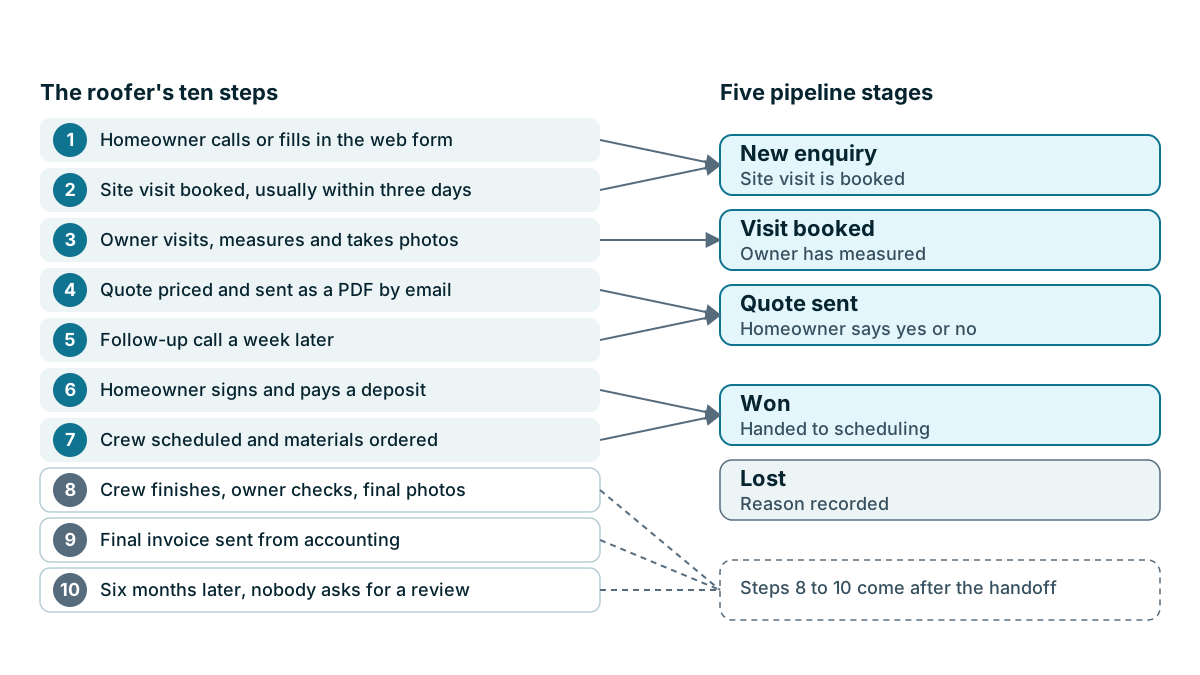
The roofer's ten steps might become:
| Pipeline stage | What it means | Rule for moving on |
|---|---|---|
| New enquiry | Someone has been in touch | Site visit is booked |
| Visit booked | Date is agreed | Owner has measured |
| Quote sent | PDF is with the homeowner | Homeowner says yes or no |
| Won | Signed with deposit paid | Handed to scheduling |
| Lost | They said no or went silent | Reason recorded |
The third column matters most. A stage with no clear rule becomes a matter of opinion, and then your pipeline stops meaning anything. Quote sent means the quote has been sent, not that you plan to send it.
In the roofer example, steps 1 and 2 sit in New enquiry, step 3 in Visit booked, steps 4 and 5 in Quote sent, and steps 6 and 7 in Won. Steps 8 to 10 happen after the handoff, so they stay off the sales pipeline. Lost has no step of its own, because a deal can stop at any point.
Who should check your page?
Show your page to whoever else touches a sale. People almost always do something different from what the owner thinks they do. A bakery wholesaler might find that the owner believes samples go out within two days, while the driver knows they go out whenever there is a delivery in that area. A two-person agency might find each partner chases proposals in a different way.
Don't treat this as a chance to catch anyone out. You are looking for what really happens, because that is what a CRM will have to fit.
Tip
Write down the exceptions too. What happens with repeat customers? Are there rush jobs? Is there a type of customer who buys differently? You don't need to design for every one, but a demo can only be tested against a case you have written down.
Add the people and the numbers
Finish the page with three short lists. You will need them over the next few lessons:
- Who will use it? Names and what each person does. Include occasional users, such as a bookkeeper who only needs to look something up.
- What volume? Rough counts of leads per month, open deals, and customer records you would import.
- What other tools must it live alongside? List your email, calendar, accounting software, phone system and anything else you use daily.
How will you use this page?
From now on, every CRM you look at gets judged against this page, not against its own feature list. When a salesperson offers a demo, send them your steps and ask to see those steps performed. A good vendor will be glad to. One who keeps returning to their usual script has told you something useful.
Key takeaways
- Write your process from your last three real sales, including who does what and which tools they use.
- Mark where things get dropped, retyped or delayed. Those marks are your shopping list.
- Turn steps into a handful of pipeline stages, each with a clear rule for moving on.
- Check the page with everyone who touches a sale, then judge every CRM against it.
Common questions
Why map your sales process before you look at a CRM?
A demo shows you what a product does best, on sample data. A written page about how you really sell gives you something to measure every product against, and it costs nothing but an afternoon.
How many past sales should I use to write my process?
Use your last three real sales. Write down what actually happened, not how you wish it had worked.
Does my sales process page need to look neat?
No. Crossed-out notes on a sheet of paper are fine. What matters is that the page matches what really happens.
Keep your place and test yourself
Enroll for free to save your progress, take the chapter quiz, and get a certificate when you pass every chapter. The lessons stay open to everyone either way.