

Trials That Test Real Work
Clicking around a sample account teaches you very little. Here is how to run a short, structured trial using your own data, people and deals.
Lesson 5 of 6 · 6 min read ·
Trials often go like this. You sign up, click around for 20 minutes, look at some sample data, get pulled onto a customer call, and never come back. Two weeks later a reminder tells you the trial has ended, and you decide on gut feeling.
You can do far better without spending much time. A good trial is a small experiment: real data, real people, and a list of jobs that must pass. Limit it to two products, three at the most. Each one takes real effort, and you will start to blur them after that.
What should you do before the trial starts?
Do the setup steps first, or the trial clock will run out while you are still getting set up.
- Choose your two finalists using your must-have list and true cost
- Check the trial length and whether it can be extended if needed
- Confirm that the trial includes the tier you would actually buy, since some trials differ from paid plans
- Prepare a small data file, about 20 to 50 real contacts and some open deals
- Pick who will take part, and block time in their calendars
- Decide what you will test, and write it down
Don't import everything. A small, real sample shows you whether the import works and lets you see your own customers in the system. You don't want hours of cleanup in a tool you may not choose.
Also, read the terms before you upload real customer details. Check what the trial allows, how data is removed if you don't continue, and whether a data rule in your area applies to you.
What should your test script cover?
Turn your process page into a script. It is a set of tasks your team will perform, in order, using real deals. Your must-have list, written as jobs, gives you most of it.
Example
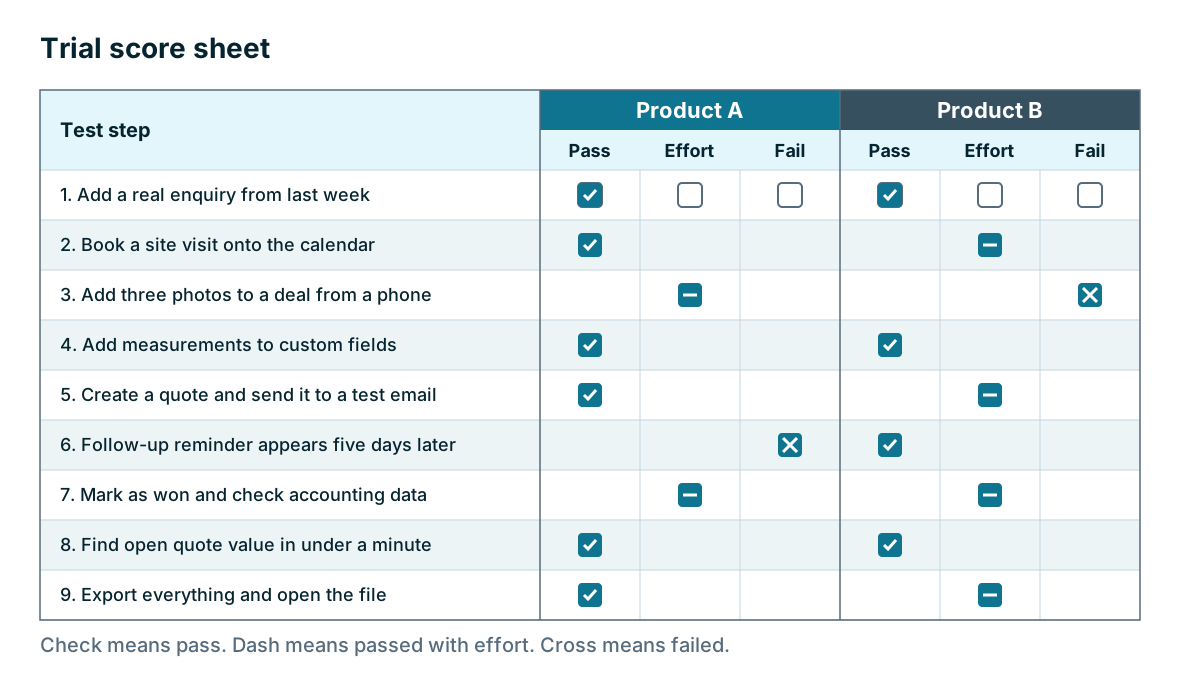
An invented example: a roofer's test script.
- The office manager adds a real enquiry from last week.
- She books a site visit and it appears on the owner's calendar.
- The owner opens the deal on his phone on site and adds three photos. He tries it with a weak signal.
- The owner adds the measurements in the custom fields.
- The office manager creates a quote and sends it to a test email address.
- A follow-up reminder appears five days later. They shorten the wait so they can check it within the trial.
- They mark the deal as won and check what reaches the accounting software.
- The owner opens the pipeline and finds open quote value in under a minute.
- They export everything to a file and open it.
If your script works on real deals, you've learned most of what a trial can teach. Keep it to about ten steps. If a step fails, write down why and move on. Don't spend the trial trying to work around one problem.
Have the real users do it
The owner choosing alone is a common mistake. The people who will use the tool every day should run the script themselves. If your salesperson finds logging a call slow, your opinion on that doesn't matter much. Their habit is what decides whether your data stays accurate.
Watch one of them work through a few steps without helping. Note where they stop, where they look confused, and what they say under their breath. This is the most useful ten minutes of the trial.

Which everyday actions should you time?
A CRM wins or loses on the small things you do 30 times a day. Time these:
- Logging a call after you hang up
- Adding a new contact and deal
- Finding a customer from your phone
- Updating a deal stage
- Seeing what you need to do today
Compare the same actions across both products. A few extra clicks per action, multiplied by every action in a day, is often what stops people using a tool.
| Weak trial | Strong trial |
|---|---|
| Sample data | Your own contacts and deals |
| The owner clicks around | The real users run a script |
| Tests features | Tests jobs from your process |
| Desktop only | Includes phone, in real conditions |
| Ends with a feeling | Ends with notes on every step |
| Never tests support | Asks support a real question |
| Never tests leaving | Exports data and opens the file |
Which parts of a CRM do vendors not demo?
Support. Ask a real question and see how long it takes to get a useful answer. Check that the support you get on a trial is the same as you would get on your plan, as trial users are sometimes treated differently.
Data export. Export your contacts, deals and notes, then open the file. We will come back to this in the next lesson, as it matters more than most people think.
Permissions. Log in as a regular user and check what they can see, change and delete.
Mistakes. Delete a test record by accident. Can you get it back?
Watch out
Be careful with sales-assisted trials, where a vendor sets everything up for you. The help can be useful, but you may end up testing their consultant and not the product. Make sure you can make one of the changes yourself, like adding a field or a pipeline stage, before the trial ends. After you buy, that will be your job.
Score right away
After each session, have each person write down a score for each step: passed, passed with effort, or failed. Add one line on what they liked and what annoyed them. Do this the same day. A week later, people will remember only the salesperson and the colors.
Tip
Keep a list of every question that came up during the trial. If a sales conversation follows, send the list and ask for answers in writing. It saves time and keeps the conversation about your business.
Key takeaways
- Test two products, three at most, with a small sample of your real data.
- Turn your process into a script of about ten steps and have real users run it themselves.
- Time the small actions you do many times a day, because that decides whether people keep using it.
- Test support, permissions, mistakes and data export, not just the features in the demo.
Common questions
How many CRMs should I try in a trial?
Two, or three at the most. Each one takes real effort, and you will start to blur them together after that.
Should I import all my customers into a trial?
No. A small sample of about 20 to 50 real contacts and some open deals shows whether the import works, without hours of cleanup in a tool you may not choose.
Who should run the trial with me?
The people who will use the tool every day should run the script themselves. Their habits decide whether your data stays accurate.
Keep your place and test yourself
Enroll for free to save your progress, take the chapter quiz, and get a certificate when you pass every chapter. The lessons stay open to everyone either way.