

The Decision, the Scorecard, and How to Leave Later
Score your finalists, make the call, and check you can get your data out before you sign. Good buyers plan the exit on day one.
Lesson 6 of 6 · 7 min read ·
You have a process page, a must-have list, true costs and trial notes. This lesson pulls them into a decision, then deals with something most buyers skip: how you would leave.
Step 1: must-haves are pass or fail
Before you score anything, cross off any product that failed a must-have. Don't let a high score on other things rescue it. That was the point of your list. If every product failed something, revisit whether that item was really a must-have, or whether a workaround would do. If it was, keep looking.
Step 2: build a weighted scorecard
For the products still standing, score how well each one does, not just whether it does it. Give each criterion a weight from 1 to 5, based on what matters to you. Score each product from 1 to 5 using your trial notes. Multiply and add up.
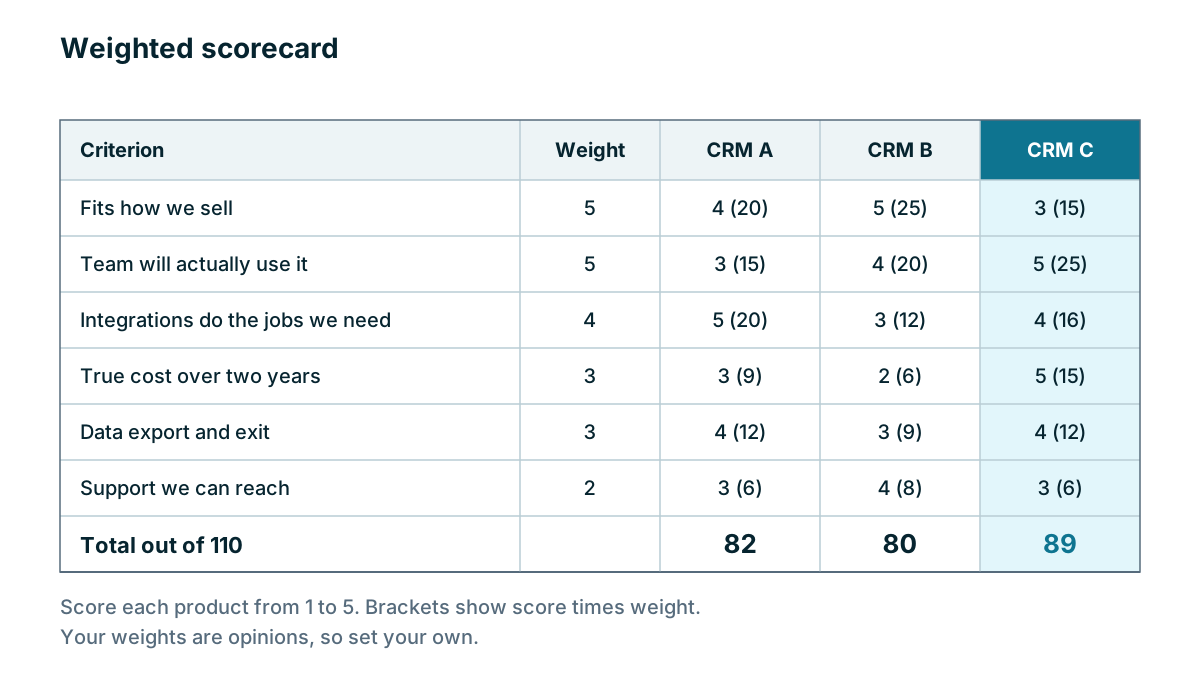
Here is an invented example. A small roofing company compares three invented products, CRM A, CRM B and CRM C.
| Criterion | Weight | CRM A | CRM B | CRM C |
|---|---|---|---|---|
| Fits how we sell | 5 | 4 (20) | 5 (25) | 3 (15) |
| Team will actually use it | 5 | 3 (15) | 4 (20) | 5 (25) |
| Integrations do the jobs we need | 4 | 5 (20) | 3 (12) | 4 (16) |
| True cost over two years | 3 | 3 (9) | 2 (6) | 5 (15) |
| Data export and exit | 3 | 4 (12) | 3 (9) | 4 (12) |
| Support we can reach | 2 | 3 (6) | 4 (8) | 3 (6) |
| Total out of 110 | 82 | 80 | 89 |
CRM C wins even though it scored lowest on fit, because the team liked it and it costs less. That result should give you a moment's pause. Is a lower fit score something you can live with? Scorecards inform a decision. They don't make it. Your weights are opinions, and the small gap between 82 and 80 means nothing at all.
If two products are close, ask a simple question: which one did your team choose to open again during the trial? Treat that as the tie-breaker.
A few well-known options you may have come across are HubSpot, Pipedrive, Zoho CRM, Freshsales and Salesforce, along with many smaller products, including some built for a single trade. We aren't ranking them, because what suits you depends on your page and your own trial. They differ in size, price and complexity, and all of those change over time, so check for yourself.
Coeffection is one option too, and here is where it fits. It's built for teams of roughly 20 to 200 people that need their own record types, pipelines that differ by team, and quoting that runs through to the invoice. If you are a solo owner or a small team with a simple sales process, it is probably the wrong pick. A simpler tool will suit you better, and you will be up and running sooner.
Step 3: think about leaving before you sign
Your business will change. A product may raise its prices, get bought or stop fitting you. None of that is a disaster if you can take your data and go. It can be very expensive if you can't. Lock-in rarely comes from one big trap. It tends to build up from small things.
Your data. Can you export everything yourself, at any time, in a common format such as CSV? Check for contacts, companies, deals, notes, activity history, custom fields and attachments. Exports often cover the first few well and the rest poorly. An export of contacts alone leaves behind the history that made the CRM worth having.
Your links. Does the export keep the connections between records? A file of notes is much less useful if you can't tell which customer each note belongs to. Look for ID columns that tie records together.
Your files. Photos, contracts and quotes attached to records are often the hardest to get out in bulk.
Your automations. Workflows and templates usually don't transfer. You will need to rebuild them, so keep them simple and write down what they do.
Your contract. Check the notice period, what happens to your data after you cancel, and how long you have to retrieve it.

How do you run the exit test?
Run the exit test during the trial, before you pay anything.
- Export all contacts, deals and notes yourself, without help from support
- Open the files and check that custom fields came through
- Check that notes and activities still show which customer they belong to
- Find out how to get attachments out
- Read the terms on what happens to your data when you cancel
- Find the notice period and put it in your calendar
- Write down in a few lines how you would move to another tool
Should a product fail here, you can still buy it, as long as you do so knowing the cost. Treat a weak export as a real cost when you score that product.
Watch out
Some vendors offer a full data export only on higher plans, for a fee, or by request. The rules vary and can change, so check the current terms for the plan you would buy. If you can't get a clear answer from the help documents, ask for it in writing.
Tip
Once you're live, schedule a full export every three months and keep it somewhere safe. It takes minutes, it proves the export still works, and it gives you a backup that doesn't depend on any vendor.
Step 4: decide and commit
Set a decision date and stick to it. Waiting for a perfect tool costs you too, as those dropped leads keep on dropping. A good enough CRM that your team uses will beat a better one you are still researching.
Once you've decided, write one short paragraph: what you chose, why, what it will cost, and what you gave up. Keep it with your scorecard. A year from now, you will want to remember your reasoning when the renewal comes up.
Then tell your team what happens next, who is setting it up, and when the old spreadsheet stops being the record. Keeping both running for long means nobody knows which is true.
Key takeaways
- Must-haves are pass or fail. Then use a weighted scorecard to compare the survivors, and treat close scores as a tie.
- A scorecard informs the decision. When it's close, go with what your team actually used.
- Test the full data export during the trial, and open the file.
- Plan your exit on day one: contract notice, data format, attachments, and a regular backup.
Common questions
How do I score CRM products fairly?
Give each criterion a weight from 1 to 5 based on what matters to you. Score each product from 1 to 5 using your trial notes, then multiply and add up. Use your own weights, not someone else's.
What should I check in a CRM data export?
Check that you can export contacts, deals, notes, activity history, custom fields and attachments yourself, in a common format such as CSV. The notes should still show which customer they belong to.
What if two CRMs score about the same?
Pick the one your team chose to open again during the trial. A good enough CRM that your team uses will beat a better one you are still researching.
Keep your place and test yourself
Enroll for free to save your progress, take the chapter quiz, and get a certificate when you pass every chapter. The lessons stay open to everyone either way.