

MCP in Plain Words
MCP, the Model Context Protocol, is an open standard that lets an AI app connect to other software. Here is what it is, what clients, servers and tools are, and what it means for a small business.
Lesson 4 of 8 · 7 min read ·
If you read about AI tools for long, you'll meet the letters MCP. Vendors mention it on pricing pages, and people in forums talk about connecting it to everything. It sounds technical, and parts of it are. The idea underneath is simple, and it's worth understanding before anyone asks you to switch it on.
What is MCP?
MCP stands for Model Context Protocol. It's an open standard, which means a published set of rules that anyone can follow without asking permission or paying for it. The rules describe how an AI app can connect to other software, ask what that software offers and then use it.
Before a standard like this, each AI app needed its own custom connection to each piece of software. Ten apps and ten systems could mean a hundred separate connections, each built and kept up by somebody. With a shared standard, a piece of software can offer one connection that follows the rules, and any AI app that follows the same rules can use it.
That's the whole point. One AI assistant can work across your CRM, your calendar and your files, through connections that all speak the same language.
What are clients, servers and tools in MCP?
MCP has three main parts. The names come from software, but the ideas aren't hard.
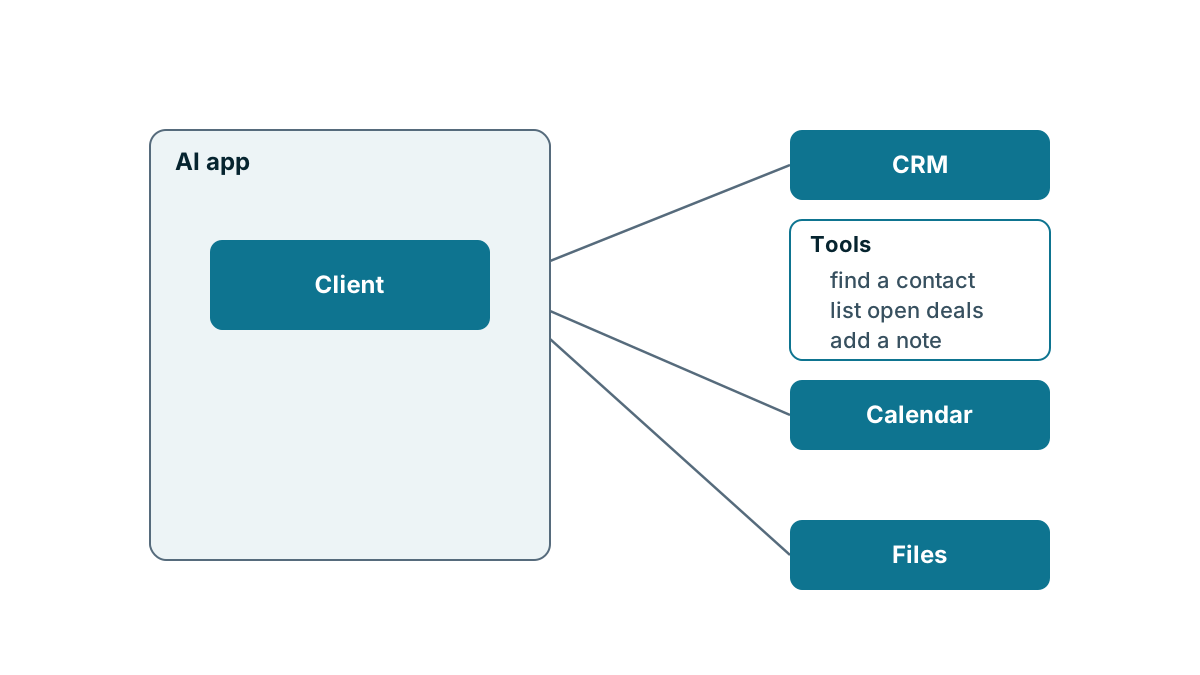
The client sits on the AI side. It lives inside the AI app you use, and it knows how to talk to servers using the MCP rules. Well-known AI apps such as Claude and Cursor can act as clients, and others may too. Check the app's own documentation rather than assuming.
The server sits on the side of the other software. A CRM, a calendar or an accounting system can have an MCP server that offers some of what it can do to any client that connects. Despite the name, it doesn't have to be a big machine in a data center. It's simply the program that answers the client.
The tools are what a server offers. Each tool is one specific thing, such as find a contact, list open deals or add a note to a record. A server can also offer data for the AI to read. The AI app sees the list of tools, and when you ask it something, it decides which tool to use, asks the server to run it and gets the result back.
An everyday way to picture it
Picture a new office manager on her first day. She needs things from three departments: sales, scheduling and accounts. Each department has a front desk with a printed list of the requests it handles, such as look up a customer, book a slot or check whether an invoice is paid.
The office manager is the AI app. Her phone, and the polite way she knows to ask any desk for something, is the client. Each front desk is a server. The printed list on each desk is the set of tools.
Two things in the picture matter. First, each desk decides what's on its list. If accounts doesn't offer issue a refund, she can't ask for one, however she phrases it. Second, each desk decides what she's allowed to see when she asks. A good desk checks who's calling before it hands anything over. MCP is the agreed way of asking. It isn't the thing that decides what's allowed.
What does MCP mean for a small business?
More choice. If your CRM offers an MCP server, you may be able to use the AI app you like with it, rather than only the assistant your CRM provides. If your AI app can act as a client, it may be able to reach several of your systems.
Less custom work. A standard connection is usually simpler than paying someone to build one from scratch. It's still not zero work. Someone has to set it up, give it the right access and keep an eye on it.
The same old questions. MCP doesn't make the AI more accurate, and it doesn't make a connection safe on its own. A server can offer tools that only read, or tools that change and delete. It acts with whatever access you give it. The next lesson covers how to set that up carefully.
Watch where servers come from. Some MCP servers come from the maker of the software. Others are written by third parties or hobbyists. A server sits between your AI and your data, so treat it like any other software you'd give a password to. Prefer the vendor's own, and ask your CRM vendor what they support or recommend.
A worked example
Here is an invented locksmith firm with six staff. The owner already pays for business accounts with an AI app, and she wants to ask it which commercial customers are due a lock audit this month.
She checks her CRM's documentation. It describes an MCP server, lists the tools it offers and says which plan includes it. The tools include find contacts, read deals and add notes. One tool, update deal, can change records.
She makes three choices before connecting anything. The AI will connect through a separate CRM user with a limited role, not her own owner login. She'll turn on the read tools only, for the first month. And her AI app is set to ask before it runs any tool, so she can see what it's about to do.
After a month, the audit list is working well. She adds the add-note tool so the AI can record a summary on a contact, and leaves update deal switched off. Nothing about MCP forced those choices. She made them, and the standard made them easy to see.
Watch out
Features change quickly in this area. Whether a CRM offers an MCP server, which tools it includes and which plans include it all differ from product to product. Read the CRM's own documentation, and test in a trial before you rely on anything you've read elsewhere, including here.
Key takeaways
- MCP is an open standard that lets an AI app connect to other software in a shared way.
- The client is on the AI side, the server is on the software side and tools are the specific things a server offers.
- MCP is the way of asking. The server and its settings decide what's allowed.
- Prefer servers from the software's own maker, start with read-only tools and check your CRM's documentation for what it supports.
Common questions
Does MCP make an AI assistant more accurate?
No. MCP doesn't make the AI more accurate, and it doesn't make a connection safe on its own.
Who decides what an AI can do through an MCP connection?
The server and its settings decide. A server can offer tools that only read, or tools that change and delete, and the AI acts with whatever access you give it.
Should I connect any MCP server I come across?
Prefer servers from the software's own maker, and treat a server like any other software you'd give a password to. Ask your CRM vendor what they support or recommend.
Keep your place and test yourself
Enroll for free to save your progress, take the chapter quiz, and get a certificate when you pass every chapter. The lessons stay open to everyone either way.