

Keeping a Person in the Loop
The question isn't whether to use AI but how far to let it go alone. Here is a simple ladder, a test for each task, and how to make sure human review stays real.
Lesson 6 of 8 · 6 min read ·
Your name is on everything your business sends. If software tells a customer the wrong price, the customer doesn't blame the software. They look at you.
That makes the useful question simple. For each task, how far should you let the software go before a person looks at it?
The ladder
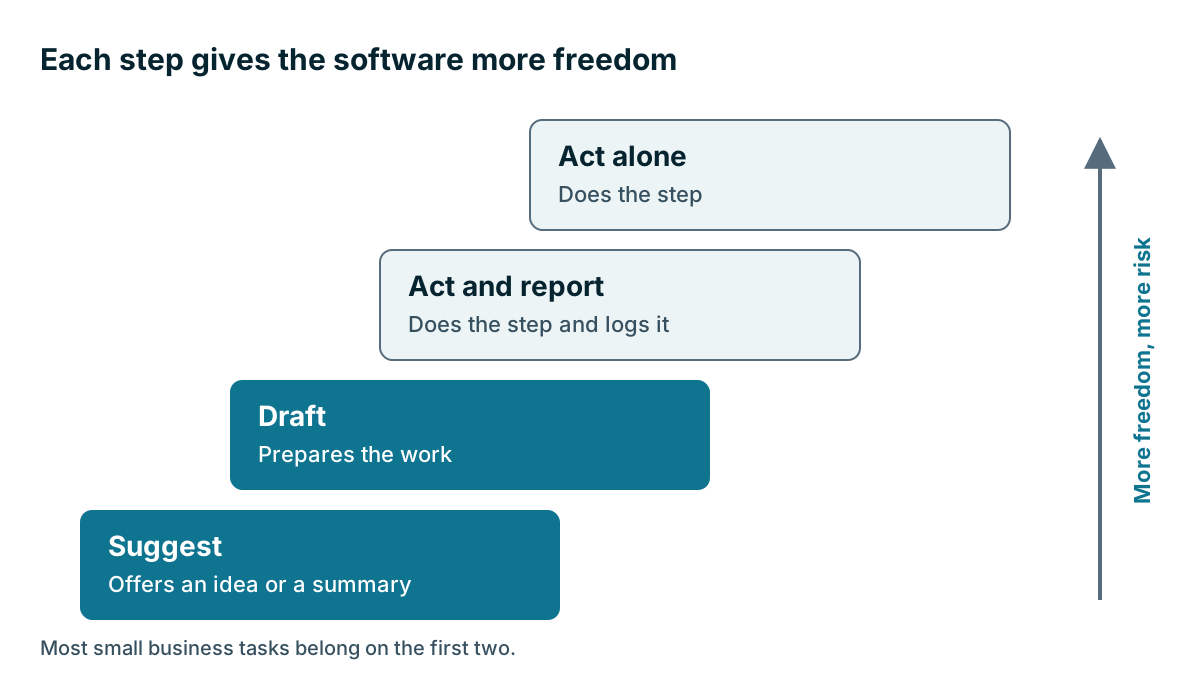
Think of four steps, each with more freedom and more risk.
| Step | What the AI does | What a person does | Example |
|---|---|---|---|
| 1. Suggest | Offers an idea or a summary | Decides and acts | Summarizes a call before you ring back |
| 2. Draft | Prepares the work | Reads, edits and sends | Writes a follow-up email for you to review |
| 3. Act and report | Does the step and logs it | Reviews afterward | Fills in a contact's address from an email signature |
| 4. Act alone | Does the step | Spot checks, or nothing | Replies to customers with nobody looking |
Most of what a small business needs from AI today sits on steps 1 and 2. Step 3 suits work inside your own records that's easy to fix. Step 4 is where the demos are, and it's where you should be most careful.
How do you find the right step for a task?
Ask four questions to find the right step.
- Will a customer see it? Anything that reaches a customer should have a person read it first.
- Does it touch money? Prices, discounts, refunds, invoices and payment terms need a person.
- Can you undo it? A wrong field can be corrected. A sent email can't be called back, and a deleted record may be gone.
- Is it a judgment about a person? Decisions about staff performance, whether to drop a customer or whether to extend credit shouldn't be left to software.
If the answer to any of these is yes, stay on step 1 or 2. If they are all no, step 3 may be fine.
What does real review look like?
A person in the loop only counts if the person is really reading. This is the hard part, and it's more about people than software. After twenty good drafts in a row, anyone starts to skim. The twenty-first has the wrong date in it, and they click send. This habit is called automation bias: when a machine is usually right, people stop checking it.
These habits help:
- Keep the checking list short. Names, dates, amounts and promises. Four things can be checked in seconds.
- Keep the source in view. It should sit next to the draft, so that checking takes one glance.
- Slow the send. Make the reviewer open a draft and press send, and don't offer an approve-all button.
- Name who's responsible. The person who presses send owns the message, as if they had written it.
- Spot check. Once a week, someone other than the reviewer looks at a small sample.
A worked example
Here is an invented pest control firm with a shared inbox. They try AI drafts for routine enquiries. The numbers below are made up and aren't a measure of any product.
For the first month, every draft goes to the office manager, who sorts each result. Here is the first week.
| What happened to the draft | Count |
|---|---|
| Sent with no change | 38 |
| Edited, then sent | 10 |
| Thrown away and rewritten | 2 |
| Total | 50 |
So 38 of 50 were good as they stood, which is 76%. The office manager looks at why the other 12 failed, and that's the valuable part. Eight of the 12 quoted the old call-out fee, because the old fee was on an out-of-date page that the AI was reading. The other four had the wrong tone for a worried customer with an infestation.
She fixes the source page, which removes that error for good. She also decides that anything about a complaint or a health concern always gets written by a person.
Should the firm move routine replies to step 4? Not because of one good week. Replies to customers fail question one, so they stay at step 2. The drafts are saving real time, and the review takes seconds per message. That's a good place to stay.

Does review only apply to messages?
Review also applies to answers and records, not only to drafts. If you ask an assistant how many quotes went out last month, or which customers haven't been contacted since spring, the answer feels like a fact. Treat it like a draft. Check it against a saved report now and then, especially before you act on it or repeat it to someone else. If the numbers disagree, find out why before you trust either one.
The same goes for anything the AI writes into a record, such as a summary or a filled-in field. It may never be sent to anyone, but the next person to read the record will take it as true.
When can you move up a step?
Steps 3 and 4 are where AI stops suggesting and starts doing. That needs more than good drafts. It needs limits, logs and a way to stop it fast. The next lesson, on AI agents, covers how to set those up. Until you have them, stay on the first two steps.
Should customers know when they are talking to a chatbot?
If a customer is talking to a chatbot, they should know it. It's honest, and in some places it may be a legal requirement. Tell them how to reach a human, and make sure that route works.
Don't let a chatbot make commitments you won't keep. Limit what it can talk about, and give it a clear path to hand over to a person: when the customer asks, when they are upset and when the question is about price or a complaint.
Tip
Try a simple check on anything you're about to automate with AI. Imagine the worst message it could send, and picture it as a screenshot on the desk of your best customer. If that thought is uncomfortable, a person should stay in the loop.
Key takeaways
- Picture four steps: suggest, draft, act and report, and act alone. Most small business tasks belong on the first two.
- Keep a person in charge of anything customers see, anything involving money, anything you can't undo and any judgment about people.
- Review only counts if it's real, so keep checks short, put the source beside the draft and spot check.
- Tell customers when they are talking to software, and make it easy to reach a person.
Common questions
What is automation bias?
It is the habit of checking less when a machine is usually right. After many good drafts, people start to skim, and a wrong date can get sent.
Do I have to tell customers when they are talking to AI?
It is honest to tell them, and in some places it may be a legal requirement. Tell them how to reach a human, and make sure that route works.
Does a good week of AI drafts mean I can stop reviewing them?
No. One good week is not a reason to move up a step. Replies to customers stay on the draft step, where a person reads each one before it is sent.
Keep your place and test yourself
Enroll for free to save your progress, take the chapter quiz, and get a certificate when you pass every chapter. The lessons stay open to everyone either way.