

Contracts and E-Signatures
When a signed quote is enough, when you need a real contract, and how to run e-signatures so that the right version gets signed by the right person.
Lesson 4 of 6 · 6 min read ·
A yes on the phone feels good, and it's a poor thing to rely on when a job goes wrong. This lesson is about getting that yes in writing, in a way that is quick for the customer and useful to you later.
First, a plain warning. This is general guidance, not legal advice. Rules on contracts and signatures differ by country, state and type of work. An hour with a lawyer on your standard template is one of the cheapest forms of insurance you can buy.
Do you need a contract at all?
Not every job needs a long document. The question is how much you lose if the two of you remember it differently.
| Type of work | What usually fits |
|---|---|
| Small, one-off, paid on completion | Accepted quote with your standard terms |
| Larger job with a deposit | Signed quote with written terms |
| Long job, stage payments or changing scope | Separate contract, with the quote attached |
| Monthly or yearly service | Contract with term, renewal and cancellation written out |
An invented window cleaner doing one house doesn't need a contract. The same window cleaner taking on a 12-month deal for a row of shops does, because now there is a renewal date, a monthly price and a question about what happens if one shop closes.
What should a contract cover?
Your lawyer will shape the wording. You should make sure these topics are covered in language your customer can understand:
- Who the two parties are, using the legal name of the business
- What you will deliver, usually by attaching the quote
- The price, the payment schedule and what happens if payment is late
- Start date, finish date and term, if the work is ongoing
- How renewal works, and how much notice either side must give to cancel
- How changes to the job are agreed and priced
- What happens if either side has to stop
- Warranties, and limits on what you are responsible for
Then put this in the CRM as a template. Only the customer details, the dates and the attached quote should change from job to job. If salespeople can edit the terms, sooner or later someone will. Keep a separate rule for changes to terms: they go to the owner.
What does an e-signature do?
An e-signature tool sends a document by email, the customer opens it on a phone or computer, signs, and everyone gets a finished copy. It also keeps a record of who signed and when. That record is known as an audit trail, and it's a large part of what you are paying for.
Many countries have laws that recognize electronic signatures for ordinary business agreements, and some documents are excluded. Which ones depends on where you are, so ask your lawyer about anything out of the ordinary, such as property sales or anything involving a guarantee.
Why bother? Three reasons. It's faster, because nobody needs a printer. You can see whether the customer has opened it, which tells you whether to send a reminder or pick up the phone. And it leaves one finished copy with a date on it, stored in one place.
If you only sign a few documents a month, you may not need any of this. A PDF signed and emailed back, saved to the deal, can do the job. Paper works too. What matters is that a signed copy exists and that you can find it.
A worked example
Here is an invented security installer selling alarm systems to small businesses. The deal is an install at $18,000 plus 36 months of monitoring at $150 a month. All the figures are made up.
| Part of the deal | Sum | Value |
|---|---|---|
| Installation | One payment | $18,000 |
| Monitoring | 36 months at $150 | $5,400 |
| Total contract value | $23,400 |
This is the kind of deal that needs a real contract. Here is how the installer runs it:
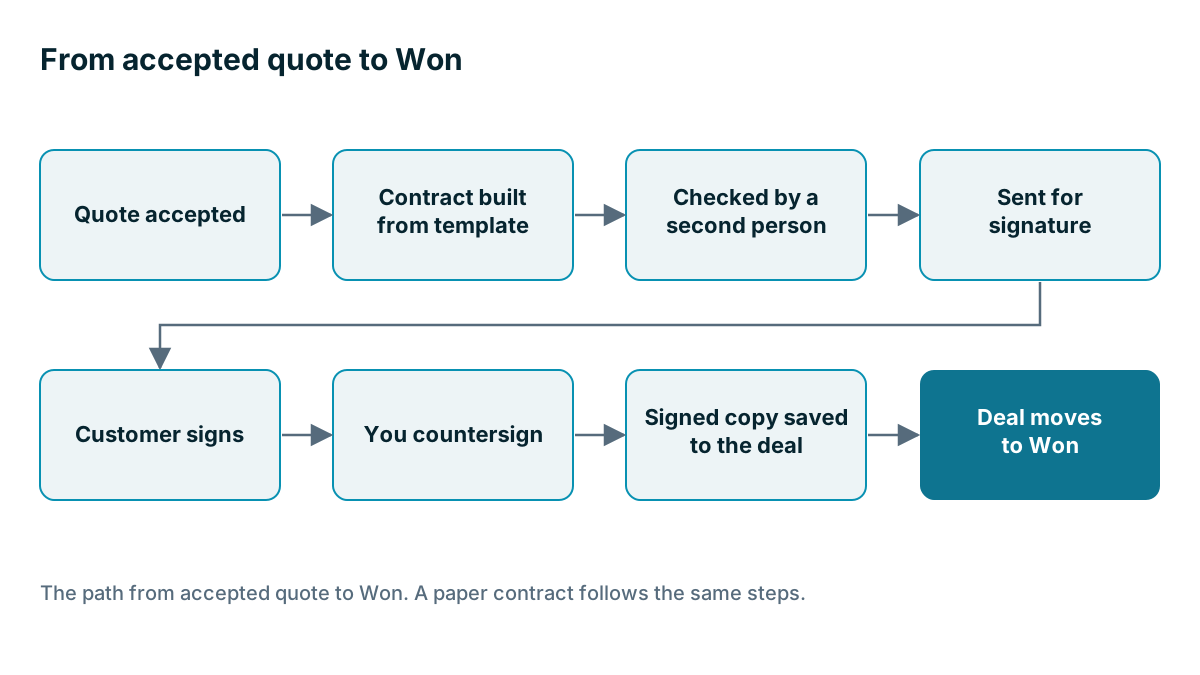
- The quote is accepted by email, and the deal moves to a Contract Sent stage.
- The office manager builds the contract from the template and attaches quote version 2.
- The owner checks it against the quote. The price, the term and the legal name must all match.
- It goes out for signature to the person with authority to sign, who is the business owner, not the store manager the salesperson has been talking to.
- Once it's signed, the installer countersigns. The signed copy goes on the deal, and the deal moves to Won.
- A task is created for 90 days before the 36 months end, assigned to the account owner, so the renewal is a conversation and not a surprise.
Step 6 is the one most firms miss. A contract end date that lives only in a PDF is a date nobody will see.

The mistakes to avoid
Signing the wrong version. The customer asked for a change, you updated the quote, and the old contract went out. Always check the numbers on the contract against the current quote just before you send it.
The wrong signer. The person you have been talking to may not be allowed to commit the business. Ask directly, in a friendly way: who signs agreements like this at your company? Ask early, because a late surprise can add weeks.
Editing after sending. If something needs to change, cancel the envelope or the document and send a fresh one. Don't send a side email saying ignore clause four.
Starting before it's signed. A keen customer says go ahead, the deal isn't signed yet, and you order materials. If the deal falls over, the cost is yours. Agree a rule on what can start without a signature, and make exceptions the owner's call.
Losing track of the end date. Store renewal and cancellation dates as fields on the deal or account, not only in the document, so that they can trigger reminders.
Example
A simple version for a two-person firm: one quote template with terms on page two, one e-signature account, a folder or deal record for signed copies and a calendar reminder for any contract with an end date. That covers most of what this lesson asks for.
What should you check in a CRM?
If contracts are a big part of how you sell, ask these questions in your trial. Can the signature tool you use connect to it? When a document is signed, does the deal's stage change by itself, or does someone have to do it? Does the signed PDF come back to the record? What happens if the customer declines? Run one real document through and watch every step. Chapter 2 has more on how to test a connection like this.
Key takeaways
- Match the paperwork to the risk. Small one-off jobs may need only an accepted quote with terms, while ongoing work needs a contract.
- Pay a lawyer once for a good template, and stop salespeople editing the terms.
- An e-signature gives you speed and a record of who signed and when, but a signed PDF or paper copy can be enough for low volume.
- Check the version and the signer before sending, and store end dates as fields so a reminder can fire.
Common questions
Is an accepted quote enough for a small job?
For a small one-off job paid on completion, an accepted quote with your standard terms usually fits. Longer jobs, stage payments and ongoing services usually need a separate contract. Rules differ by place, so check with a lawyer.
Can I sign a contract electronically?
Many countries have laws that recognize electronic signatures for ordinary business agreements, but some documents are excluded. Which ones depends on where you are, so ask your lawyer about anything out of the ordinary, such as property sales or anything involving a guarantee.
Who should sign for the customer?
Not always the person you have been talking to, because that person may not be allowed to commit the business. Ask directly who signs agreements like this, and ask early, because a late surprise can add weeks.
Keep your place and test yourself
Enroll for free to save your progress, take the chapter quiz, and get a certificate when you pass every chapter. The lessons stay open to everyone either way.