

Chapter 11: Moving From Your Old System
What to Bring and What to Leave Behind
You don't have to move everything. Sort your records into bring, archive and leave, and start in the new system with data you can trust.
Lesson 2 of 6 · 6 min read ·
The natural instinct is to bring everything. You paid to collect all that data, and someone might need it one day. That instinct is expensive. Every old record you import is one more thing to clean, search through and possibly pay for. Bad data also damages trust in a new system on its first day.
A move is one of the few good chances you get to start clean. Treat it like moving house. You don't pack the broken toaster. You sort as you go, into three piles.
Three piles
Bring. Records your team will use in the coming year. These go into the new CRM.
Archive. Records you might need to look up, or have to keep, but won't use day to day. These go into a dated, read-only folder somewhere safe.
Leave. Records with no value, such as duplicates, junk and test entries. These don't move anywhere.
| Pile | Usually includes |
|---|---|
| Bring | Active customers, recent past customers, open deals, open quotes, contracts in force, recurring work, the do-not-contact list |
| Archive | Older customers, old closed deals, signed documents, old exports, cold leads |
| Leave | Exact duplicates, test records, spam, entries with no way to reach the person |
How do you set a cutoff for old records?
Arguing over records one at a time will take forever. Set simple rules instead. A common one is to bring anyone who has bought from you, been quoted, or spoken with you in the last two or three years. Choose a period that matches how often your customers come back.
That period depends on your trade. A flooring contractor might do a job for a homeowner once every ten years, so an old customer could still be valuable. A caterer may see a corporate client every month, and a client who's been gone for two years has probably moved on. Think about how you sell, not what's common elsewhere.
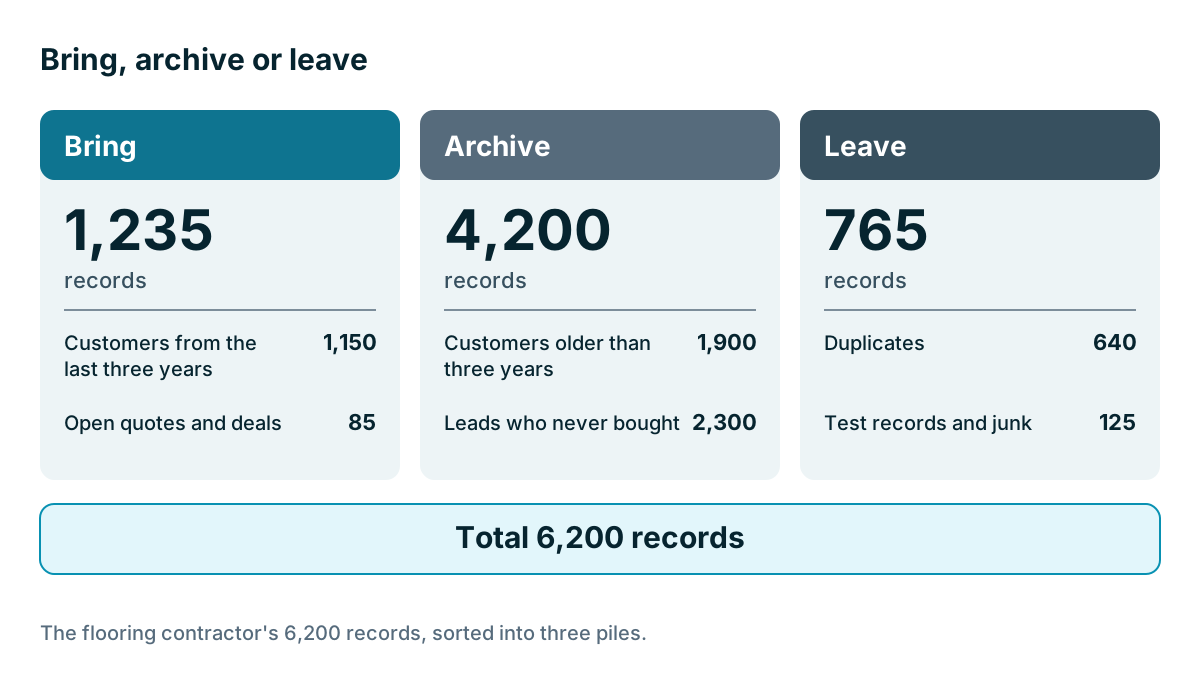
Here is an invented example. A flooring contractor has 6,200 records in an old sheet, and sorts them like this.
| Group | Records | Pile |
|---|---|---|
| Customers from the last three years | 1,150 | Bring |
| Open quotes and deals | 85 | Bring |
| Customers older than three years | 1,900 | Archive |
| Leads who never bought | 2,300 | Archive |
| Duplicates | 640 | Leave |
| Test records and junk | 125 | Leave |
| Total | 6,200 |
So 1,235 records move, 4,200 go to the archive, and 765 go nowhere. A team opening the new system finds customers they recognize, not page after page of strangers. If a salesperson later needs an old customer, the archive is there, and that one record can be added by hand. If the older customers matter for a repeat-work campaign later, they can come across as a separate, planned import.
Record counts can affect price too. Some CRMs charge by contact count, so a smaller import may save money as well. Check your plan's limits, as we covered in Chapter 2.
Which two lists must you always bring?
The do-not-contact list and records tied to money or obligation are easy to overlook, so make sure they come across.
The do-not-contact list. Anyone who has opted out of your emails or calls must stay opted out. If your cutoff drops them from the import and they're later re-added from an old list, you could end up contacting someone who asked you not to. Bring the opt-outs across with the status intact, even for people you'd otherwise leave behind.
Anything tied to money or obligation. Active contracts, renewal dates, warranties and service agreements all belong in the new system, however old they are. A plumber with a ten-year boiler warranty on file needs that record, even if the customer hasn't called since.
What about history?
Old history is where most of the hard decisions sit. Contacts and deals move fairly easily. Notes, emails and activity logs are harder, and they're often the valuable part. You have three choices.
- Bring it all, attached to each record. It's the best result, and the hardest to do. It depends on your export keeping links between records, as Chapter 2 explained.
- Bring a summary. Add one note to each customer saying when they first bought, what they bought and anything important. For your top accounts, someone can write this by hand.
- Leave it in the archive. Add one line to each record saying where to find the old history.
For most small businesses, a mix works well: bring as much history as is easy for active customers, write summaries for your top 20 or 30 accounts, and archive the rest.
Should you bring every old field?
Records aren't the only thing to sort. Look at each column too. Old systems collect fields that nobody needs anymore. Go through the list and ask when anyone last used each one. If a column is empty for most records, or nobody can say what it means, leave it behind. It can stay in the archive.
How do you keep an archive safe?
An archive only works if you can find it and if it's protected. Put it in one dated folder, with a short note saying what's in it, and limit who can open it. These files contain personal data, so treat them with the same care as the CRM.
Don't keep personal data forever by default. Privacy rules in many places expect you to hold personal information only as long as you have a reason to, and your accountant may have views on how long financial records must stay. Those rules vary by location and industry, so check what applies to you. Then set a date to review the archive, and delete what you no longer need.
Tip
Before you delete anything, keep one untouched copy of each original export. If you make a mistake while sorting, you'll want the raw file. Keep it with the archive and label it clearly as the original.
Key takeaways
- Sort records into three piles: bring, archive and leave. Don't move everything.
- Use a simple cutoff that matches how often your customers come back.
- Always bring the do-not-contact list, plus contracts, warranties and renewal dates.
- Choose how to handle history: bring it, summarize it, or point to the archive.
- Keep the archive safe, in one place, and review it. Don't hold personal data forever.
Common questions
Should I move every old record into my new CRM?
No. Records your team will use in the coming year go in. Records you might need to look up, or have to keep, can go to a dated, read-only archive instead.
What is a good cutoff for old customers in a CRM?
A common rule is to bring anyone who has bought from you, been quoted, or spoken with you in the last two or three years. Choose a period that matches how often your customers come back.
Do I have to bring opt-outs into a new CRM?
Yes. Anyone who has opted out of your emails or calls must stay opted out, so bring those opt-outs across with their status intact. Do this even for people you would otherwise leave behind.
Keep your place and test yourself
Enroll for free to save your progress, take the chapter quiz, and get a certificate when you pass every chapter. The lessons stay open to everyone either way.