

Chapter 5: Email, Phone and Integrations
Forms, Website and Lead Capture
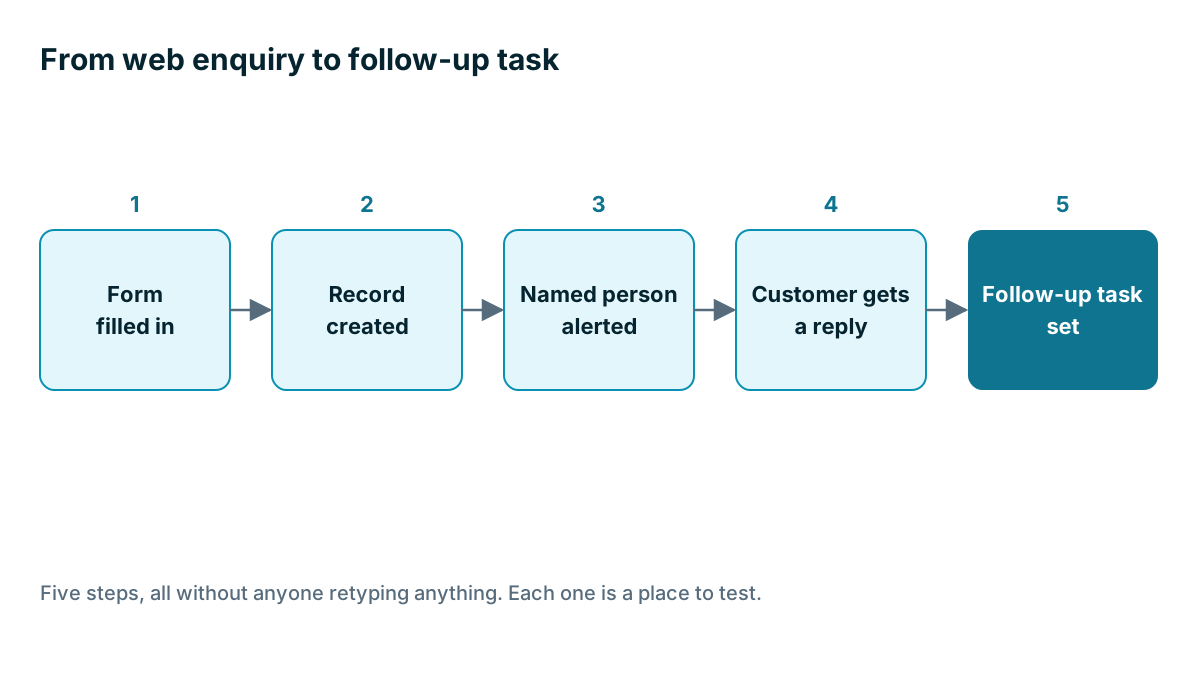
A web enquiry should become a record, reach a named person, and get a reply without anyone copying anything. Here is how to build that path, and how to check that it still works.
Lesson 4 of 6 · 6 min read ·
An enquiry from your website is the warmest thing that will happen to you today. A stranger has decided, on their own, that they might want to buy from you. Yet in many small businesses, that enquiry lands in a shared inbox, waits for someone to notice it, and gets retyped into a spreadsheet the next day. By then, the customer may have called somebody else.
The goal is one short path, with nobody needing to copy anything.
How do you connect a form to a CRM?
There are three common ways to connect a form to a CRM.
| Method | How it works | Good | Watch for |
|---|---|---|---|
| The CRM's own form | You embed a form built in the CRM on your website | Direct, and usually simple | May not match your site's look |
| Your website's form | Your site's form connects through a plugin or a built-in link | Keeps your design | Can break when the site updates |
| A connector tool | A service passes each entry from the form to the CRM | Works with almost anything | One more thing to pay for and watch |
Avoid the fourth way, which is having form entries emailed to you so someone can copy them in. It's fine for a week or two. As a long-term system, it fails on your busiest day.
How much should your form ask for?
Each extra box makes it less likely that someone will finish. Ask only for what you need to take the next step. Everything else can come out in the conversation.
Here is an invented example. A deck builder has a 14-field form on the website, asking about deck size, materials, budget and how they heard about him. He cuts it to five boxes.
- Name
- Phone or email
- ZIP code, so he can check they're in his area
- A rough description of the job
- A photo, if they have one
The source no longer needs to be asked, because the form records which page the enquiry came from. He can ask for the details on the phone. For a big or expensive job, a longer form may actually help, because the extra questions filter out people who aren't serious. So it's a tradeoff. If you get too many poor leads, a little friction helps. If you get too few, remove some.
One useful box is a dropdown with the type of job, if you route different work to different people. Use the same options as your CRM dropdown so that the values match exactly.

Who should get each enquiry, and how fast?
A form that fills up a list nobody looks at has solved nothing. Decide three things.
Who owns it? Every new enquiry should go to a named person. If you have several people, split them by area, job type or a simple rotation. Name a backup too, for holidays and days off.
How do they find out? An alert on a phone is better than an email that sits among 80 others. Test what your CRM can send.
How soon will they reply? Choose a target you can really meet, such as within two working hours, and tell the customer. An automatic reply can do this for you. Keep it short and specific, for example: Thanks, we've got your enquiry about your deck. Sam will call you by noon tomorrow. Here's what to have ready.
Promise only what you can do. A message saying you will reply within the hour, when you are on a roof, is worse than none.
Watch out
Forms attract spam. Bots fill in fake enquiries, and those can flood your CRM with junk records. Check what protection your form has, such as a hidden test field or a challenge for suspect visitors. Also consider privacy. If you collect personal details, link to your privacy notice and only add people to marketing lists if they have agreed to it. Filling in an enquiry form doesn't usually mean they want your newsletter.
Tracking where it came from
Your form can quietly record useful things: which page the person was on, which ad they clicked, and what they searched for. Many form tools can capture this with hidden fields that the visitor never sees. It's worth setting up at a basic level, because it fills in your lead source without anyone asking.
Keep it simple. Knowing that a lead came from your Deck Prices page tells you something. A dashboard with 40 marketing measures on it, for a business that gets 30 enquiries a month, is probably decoration.
The other doors
The website form isn't the only way in. List every route by which an enquiry reaches you, then decide how each one lands in the CRM.
- Phone calls. Someone adds the record while on the call.
- Website chat. Check that conversations reach the record, and find out who answers out of hours.
- Social media messages. These usually stay in the app, so someone has to add them by hand.
- Directory and booking sites. Some send emails you can parse. Others need checking daily.
- Trade shows and walk-ins. Use a phone or a simple form on a tablet, not a paper pad that sits in a bag for a week.
- Referrals. A customer gives you a name. Add it the same day, with the name of the person who referred them.
A bakery wholesaler might get most of its new accounts from a cafe owner mentioning it to another cafe owner. No form will catch that. The habit of adding a record at the moment of contact is what counts.
Whatever the door, record the source, so your counts stay honest. Otherwise your numbers will only ever describe the leads that came through a form.
How do you test your enquiry path?
Forms fail silently. A site update breaks a plugin, an alert goes to someone who left, and nobody notices because the absence of enquiries looks like a slow month.
Once a month, fill in your own form, using a clearly marked test name. Time how long it takes to appear. Check the alert, the reply and the task. Then delete it. It takes five minutes, and it can catch a failure that might otherwise cost you a month of leads.
If you are a small business with only a few web enquiries a month, an email to your phone and a good habit may be enough. Build the full path when enquiries start getting missed.
Key takeaways
- A web enquiry should become a record, alert a named person, get a reply and set a task, with no retyping.
- Ask only for what you need for the next step, and match your form's options to your CRM.
- Give every enquiry an owner, a backup and a reply time you can really meet.
- List every way enquiries reach you, including calls, chats and referrals.
- Fill in your own form every month, because forms fail silently.
Common questions
Why do website enquiries get lost?
They often sit in a shared inbox until someone notices, then get retyped into a spreadsheet, and by then the customer may have called someone else. A named owner and a phone alert help prevent that.
Can a longer form ever be better?
Sometimes. For a big or expensive job, extra questions can filter out people who aren't serious. If you get too many poor leads, a little friction helps, and if you get too few, remove some boxes.
Can enquiries from calls and social media go into the CRM too?
Yes, but each route needs its own plan. Phone enquiries can be added during the call. Social media messages usually stay in the app, so someone has to add them by hand.
Keep your place and test yourself
Enroll for free to save your progress, take the chapter quiz, and get a certificate when you pass every chapter. The lessons stay open to everyone either way.