

Chapter 5: Email, Phone and Integrations
Calendar and Meetings
Meetings are where most deals get decided, and they often leave no trace. Here is how to connect your calendar, stop the double bookings, and keep what was said.
Lesson 3 of 6 · 6 min read ·
A site visit, a showroom appointment or a video call is often the moment a deal is really won or lost. Yet in many CRMs, a meeting leaves little behind. It sat in someone's calendar, it happened, and whatever was agreed lives in that person's memory.
A calendar connection fixes three separate problems. It stops double bookings, it shows the meeting on the customer's record, and it gives you a place to keep what was said. It helps to look at them one at a time, because a CRM may solve one and not the others.
Should you keep one calendar or two?
Don't keep a separate calendar in your CRM. People already live in the calendar on their phone. If the CRM has its own, they will ignore it, or they will have to enter everything twice.
What you want is a two-way sync. A meeting booked in the CRM appears on your phone, and a meeting booked on your phone appears in the CRM.
Test these during a trial, because a one-way sync can look like a two-way one at first.
- Create a meeting in the CRM and check that it appears in your calendar.
- Create one in your calendar and check that it appears in the CRM.
- Move a meeting on your phone, then see what the CRM shows.
- Cancel one and see whether it disappears from both.
- Invite a customer and check that it attaches to their contact and deal.
- Add a private appointment and check what other people can see.
That last one matters. Colleagues may need to see that you're busy. They don't need to see that you have a dental appointment. Look for a setting that shows personal events as busy, with no details.
Booking with less back and forth
A booking link is a page where a customer picks from your open times, without the usual run of emails. It reads your calendar so it only offers free slots. You can use a separate tool or a feature in your CRM.
It's useful, but it isn't right for every trade. Here is an invented example. A kitchen fitter does design visits at customers' homes. A plain booking link might put a visit at 9 on the north side and another at 10 on the south side, 40 minutes away. She fixes that with a few limits.
- Each visit is 90 minutes, with 45 minutes of travel held after it.
- She offers home visits on only three days a week.
- A short form asks for the ZIP code and the room size, so she can see if the job fits before she drives over.
- Bookings need 24 hours' notice.
For high-value customers, you may not want a link at all. Sending a busy property developer to a booking page can feel cold, and a short personal note saying, I can do Tuesday at 2 or Thursday at 9, works just as well.
What should you do before, during and after a meeting?
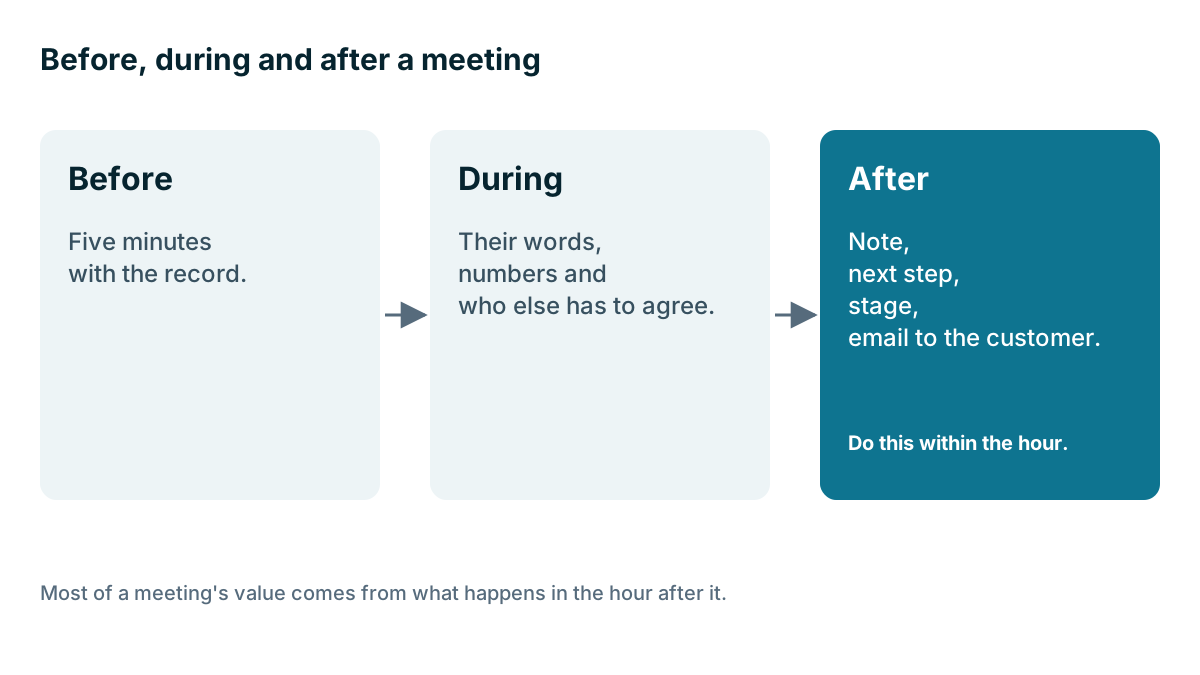
A meeting has three parts, and the CRM can help with each. The value mostly comes from what you do after.
Before. Five minutes with the record. Who is this, what have they asked about, what did we last quote? A customer notices when you remember what they told you.
During. Write down their words on their problem, any numbers, and who else has to agree. If you take notes on a laptop or phone during a meeting, say why. It helps them see that you're listening.
After. Do this within the hour. Write a short note on the deal, covering what was agreed, what you promised, and the next step with a date. Move the deal to the right stage. Then send the customer a short email confirming what you agreed, because that alone can head off misunderstandings.
Here is what a good note looks like, using the kitchen fitter from earlier:
- Agreed: full replacement, keep the existing window, island if the budget allows.
- Promised: a design and a price by Friday, and a list of three worktop samples.
- Who decides: both homeowners. He cares about price and she cares about storage.
- Next step: send the design by Friday, then call on Monday at 6, after they get home from work.
That takes two minutes to write. If she is off sick on Monday, anyone at the company can make that call and sound as if they were in the room. Compare that with a note that says, good meeting, keen.
What do you do about no-shows?
If people miss appointments, try a reminder the day before, by text or email. Many calendar and CRM tools can send one automatically. Keep it friendly, and give an easy way to rebook. Record no-shows on the deal. Someone who misses two visits has told you something, and that may change how much effort you put in.
Also watch out for time zones if you sell across regions. Check that your meeting invites show the right time for the person receiving them.
Are video call transcripts worth it?
If you meet online, your CRM may connect to your video meeting tool. At the simple end, that means a meeting link is added to the invite. At the other end, a transcription tool joins the call, writes out what was said, and adds a summary to the record.
Transcripts can be useful. You can listen properly rather than taking notes, and you can check later exactly what the customer asked for. They also have costs.
- Consent. Tell people the call is being recorded or transcribed, and be ready to turn it off. As with phone calls, the rules vary by place.
- Accuracy. Automatic summaries make mistakes, particularly with names, numbers and technical terms. Check any summary before you act on it.
- Clutter. An hour of transcript on every record makes the timeline harder to read. A short note from a person is often more useful than a long one from a machine.
- Sensitive talk. Customers tend to speak less freely once they know they're being recorded.
Think about whether you'd read it. If your meetings are mostly short site visits, a transcript tool has nothing to do. If you run long discovery calls with detail to remember, it may be worth a try.
Tip
Try writing your after-meeting note as the email to your customer. Send it and let it sync to the record. You write it once, the customer has a clear summary, and it lands on the timeline for your team.
Keep it in proportion
A solo owner with a phone calendar and a habit of adding a note may already have all of this covered. If you are the only person meeting customers, you need no double-booking protection beyond your own calendar. The connection earns its keep when several people share customers, or when you want reports on how many meetings lead to a sale.
Key takeaways
- Keep one calendar. Use a two-way sync and test it, including moves and cancellations.
- Show personal appointments as busy, with no details.
- Booking links work when you add limits such as travel time and notice, and they don't suit every customer.
- Write up every meeting within the hour: what was agreed, what was promised and the next step.
- Transcripts can help, but they need consent and a human check.
Common questions
Why does a two-way calendar sync matter?
A two-way sync keeps one calendar true in both places, so a meeting booked in either one shows up in the other. A one-way sync can look the same at first, so test both directions.
How do I stop customers booking the same time slot twice?
Use a booking link that reads your calendar, so it only offers free slots. Add limits such as travel time after each visit, the days you take visits and a notice period.
Do meeting transcripts make sense for a small business?
They can help with long, detailed calls, but they need consent and a human check. If your meetings are mostly short site visits, a transcript tool may have nothing to add.
Keep your place and test yourself
Enroll for free to save your progress, take the chapter quiz, and get a certificate when you pass every chapter. The lessons stay open to everyone either way.