

Chapter 5: Email, Phone and Integrations
Connecting Accounting and Other Tools
Decide which system owns each fact before you connect anything. Then keep your books safe, keep the handoff simple, and connect only what saves real work.
Lesson 5 of 6 · 7 min read ·
Connecting your CRM to your accounting software sounds like an obvious win. You stop typing customers twice, and invoices appear by themselves. It can be a real win. It's also the connection most able to do harm, because a wrong setting doesn't only make a mess in a sales tool. It makes a mess in your books.
The good news is that one idea prevents most of the trouble.
How do you decide who owns each fact?
Each piece of information should have one home, the system where it gets changed. Others can display it, but they shouldn't compete with it. People call this a single source of truth. If two systems both own a fact, they will eventually disagree, and nobody will know which is right.
For most small businesses, the split looks like this.
| Fact | Owner | The other system |
|---|---|---|
| Contact people, phone numbers, notes | CRM | Doesn't need most of this |
| Quotes and deal stage | CRM | Doesn't need this |
| Legal billing name and billing address | Agree on one, often accounting | Displays it, or sends it across |
| Invoice number and amount | Accounting | CRM shows it, read-only |
| Payment status | Accounting | CRM shows it, read-only |
| Tax rates and tax rules | Accounting | CRM uses them for quotes, if connected |
| Income and expense accounts | Accounting | Doesn't need this |
Sit down with your bookkeeper or accountant and go through this table for your own business. They will spot problems you won't. Most of all, ask them what they would hate to see changed from outside their system.
The handoff
Think of accounting as the point where a sale stops being a promise and becomes money. There is one moment when the deal hands over. For most businesses, that moment is when a deal is marked Won.
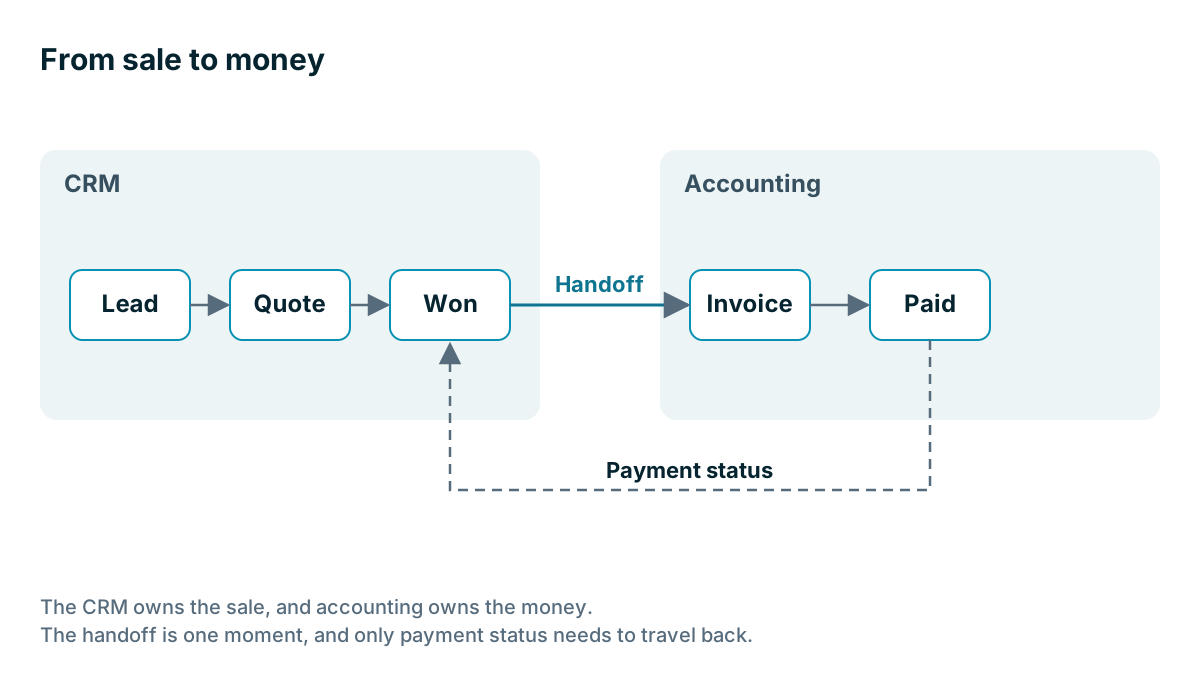
Here is an invented example. A bakery wholesaler signs a new cafe. The rep marks the deal Won in the CRM. That creates the customer in the accounting software, with its legal name, billing address and payment terms. From then on, invoices go out from accounting as usual. Each night, the invoice total and payment status come back and appear on the cafe's CRM record, read-only.
Now, before the rep calls about a new order, she can see that the last two invoices are overdue. She didn't have to ask the office. Accounting didn't have to learn anything new. And nothing in the CRM can change an invoice.
They kept that link small on purpose. Their first idea was to push every price change back and forth. Their bookkeeper talked them out of it, and they were right to listen.

What usually goes wrong with an accounting link?
Most accounting link problems are one of a small number of types.
- Duplicate customers. The CRM has Rivera Roofing and the books have Rivera Roofing LLC, so the link creates a second customer. Match your customer names before you connect.
- Mismatched products or services. Quote lines need to match the items your accounting software knows about, or they fail or land in the wrong income account.
- Tax differences. A quote may calculate tax differently from the invoice. Test with your real tax situations, including anything exempt.
- Two invoices. One came from the link, and one was typed by someone who didn't know about the link. Tell your team exactly what happens automatically.
- Silent failures. A sync stops, nobody is alerted, and three weeks later nothing matches.
Watch out
Start with a test company in your accounting software, if it offers one. Set the first connection to send as little as possible. Don't turn on any setting that overwrites existing records until your bookkeeper has seen the results. Take a backup or export first, because a bulk mistake in your books is slow and expensive to fix.
In what order should you connect the two?
If you do connect the two, go slowly. This order keeps any mistake small.
- Week one: agree the table. Fill in the ownership table with your bookkeeper, and write down what the link should do in one sentence.
- Week one: tidy the names. Compare your customer lists and fix mismatches on both sides.
- Week two: test. Use a test company or a clearly marked test customer. Run a normal sale, a sale with a discount, a tax-exempt sale and a cancelled sale.
- Week three: go live for new customers only. Leave existing customers alone until the new ones run cleanly.
- Week four: check. Ask your bookkeeper to compare a sample of records in both systems.
Then add a monthly reminder to run that same sample check. It's how you find out about a sync that has stopped.
Should invoices start in the CRM at all?
You have two sensible patterns.
Keep invoicing in accounting. The CRM stops at Won, and someone creates the invoice in the accounting software. This is the simplest choice, and for a small business with few invoices, it may be the right one forever.
Generate invoices from the deal. The quote's line items flow into an invoice without retyping. It suits you if you send many detailed quotes, and retyping lines causes errors or delays. Some CRMs do this as a main feature, some through a connector. Coeffection, for example, builds the quote and sends the contract through DocuSign, then generates the invoice in QuickBooks or NetSuite, without leaving the deal. It's meant for teams of roughly 20 to 200, so a small team may find a lighter tool, or a simple accounting link, better suited.
Before you pay for either, work out the actual time saved. If you send 12 invoices a month and each takes five minutes to type, that's an hour a month. An integration that costs more than an hour of your time per month may not be worth it, however neat it looks.
Other tools
The same rules apply to the rest of your software. Here are the usual candidates.
- E-signature. A signed document should come back to the deal, and ideally move it forward.
- Job scheduling or field service. A won deal should become a job, without being retyped. Decide which system owns job status.
- Online shop or booking system. Orders may belong on the customer's record. Summaries are often enough.
- Email marketing. Agree which system owns unsubscribes, and make sure that an opt-out in one reaches the other.
- File storage. Link to folders instead of copying files everywhere.
For each one, ask the same three questions. Who owns this fact? What moves, and when? What's the job this connection does for us? If you can't describe the job in a sentence, you probably don't need the connection.
And it's fine to leave a gap. If the owner checks the accounting screen once a week before calling a slow payer, that may be cheaper than any sync.
Key takeaways
- Give each fact one home. The CRM owns the sale, and accounting owns the money.
- Involve your bookkeeper early, and start in a test company with the smallest possible link.
- Match customer names, products and tax handling before you connect.
- Send customer details across at the handoff, and bring payment status back read-only.
- Work out the time saved. A manual step you do twice a month may be fine.
Common questions
What should a CRM and accounting software each own?
The CRM owns the sale, including contacts, quotes and deal stage. Accounting owns the money, including invoice numbers, amounts, payment status and tax rules, and the CRM shows the invoice and payment status read-only.
What is the safest way to connect a CRM to accounting?
Start in a test company, set the first connection to send as little as possible, and go live for new customers only. Take a backup or export first, and don't turn on any setting that overwrites records until your bookkeeper has checked the results.
Is it worth creating invoices from a CRM?
It depends on volume. If you send many detailed quotes, generating invoices from the deal can save retyping. If you send few invoices, keeping invoicing in accounting may be the right choice for good.
Keep your place and test yourself
Enroll for free to save your progress, take the chapter quiz, and get a certificate when you pass every chapter. The lessons stay open to everyone either way.