

Chapter 1: Do You Need a CRM Yet?
What a CRM Won't Fix
Software can hold information and send reminders. It can't create demand, fix a weak offer, or make people use it. Know the difference before you spend.
Lesson 4 of 5 · 6 min read ·
A CRM helps you handle the leads you have. It does very little about the leads you don't have, and nothing about whether your price, offer or service is any good. Many disappointing CRM projects start with a problem the software was never going to solve.
So before you buy, diagnose. Here are the problems owners most often hope a CRM will cure, and what actually helps with each.
Will a CRM fix having too few leads?
If you have five enquiries a month and you follow up on all of them, a CRM will give you a very tidy view of five enquiries.
Some CRMs include lead generation extras, like web forms, contact databases or ad tracking. Those can be useful, but they are marketing tools that happen to sit in the same product. The work of getting people to know you exist still has to be done.
Test: in the last 90 days, did you lose work because you dropped leads, or because there weren't enough? Count them. If you followed up on nearly everything and still came up short, spend your money and time on marketing and referrals, not on software.
Leads that were never a fit
If most of your quotes go to people who were never going to buy, tracking them more carefully only makes you busier. A roofer who drives to 15 sites a week to quote jobs that go to the cheapest bidder has a qualifying problem. A couple of questions on the first phone call might do more than any software.
Will a CRM fix prices and offers that don't sell?
If people keep saying no at the quote stage, a CRM can show you that it is happening. Seeing it is useful, because you will have the numbers and the reasons in one place. It still can't tell you whether your price is wrong, your proposal is unclear, or your competitor is simply better. That takes conversations with customers, and judgment.
What if your team won't use it?
Getting the team to use it is the biggest risk. A CRM can work perfectly and the project can still fail, because people kept using their notebooks.
A CRM only knows what someone tells it. If your salesperson doesn't log calls, your pipeline shows nothing, your reports are fiction, and you are paying for an expensive empty database. Often the reason is sensible. The software asks them to do extra typing and gives them nothing back.
Three things help:
- The owner uses it first. If you ask for updates by phone instead of opening the pipeline, everyone learns the CRM is optional.
- Run the sales meeting from the screen. If it isn't in the CRM, it doesn't get discussed.
- Keep required fields to a minimum. Every extra mandatory field is a small reason to avoid logging the deal.
Watch out
Avoid any setup that exists only so a manager can watch. If the tool's only purpose in your team's eyes is reporting on them, they will do the bare minimum. Make sure it saves them time too: fewer repeat questions, reminders they actually want, and customer history one tap away.

What if nobody has agreed on the process?
Software makes a process faster. If you don't have one, you get confusion at higher speed.
If two people on your team handle new enquiries differently, with different steps and different promises, a CRM will just record both versions. If nobody can say when a quote should be chased, an automated reminder can't help, because nobody knows what to set it to.
Chapter 2 starts by having you write down how you sell, for exactly this reason. It takes an afternoon, and it is worth doing even if you never buy anything.
What if your existing data is messy?
Importing a messy spreadsheet into a CRM gives you a messy CRM. Duplicates stay duplicates. Phone numbers that were wrong stay wrong. A new system feels clean for about a day, until someone looks up a customer and finds three records.
Clean the data before you move it. Delete dead records, merge duplicates, and agree on a format for names and phone numbers. Skip this job and people can lose faith in a new system during week one.
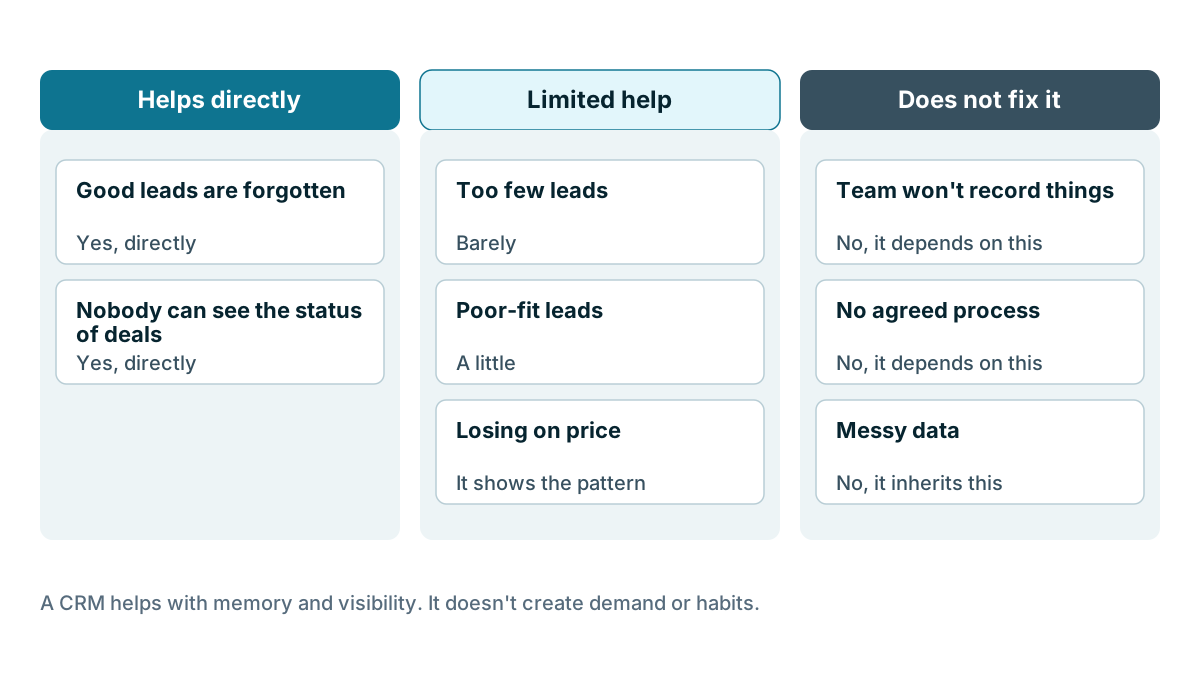
| Problem | Will a CRM help? | What actually fixes it |
|---|---|---|
| Good leads are forgotten | Yes, directly | Reminders and a shared pipeline |
| Nobody can see the status of deals | Yes, directly | One shared record |
| Too few leads | Barely | Marketing, referrals, reputation |
| Poor-fit leads | A little | Qualifying questions, clearer positioning |
| Losing on price | It shows the pattern | Pricing and offer changes |
| Team won't record things | No, it depends on this | Owner habits, less typing |
| No agreed process | No, it depends on this | Write it down first |
| Messy data | No, it inherits this | Clean up before you import |
Run the diagnosis
Before you read the next lesson, write one sentence: The problem I want a CRM to solve is ... Then check it against the table above.
Example
An invented example. The owner of a small HVAC company writes: the problem is that sales are down. That is a result, not a problem a CRM can solve. She digs further and finds enquiries are level, but quotes are taking nine days to go out because she writes them all at night. Now she has something to work on. A CRM with quote templates might help. So might hiring someone part time, or blocking out two afternoons a week. She can weigh those fairly because she has named the real problem.
If your sentence is about remembering, sharing or following up, you are in the right place. If it is about demand, price or people, a CRM might still be useful, but it should not be your first spend.
Key takeaways
- A CRM helps you handle leads you have. It doesn't create demand or fix a weak offer.
- A CRM only works if people use it, so the owner has to use it first and it has to save the team time.
- Agree on a process and clean your data before you move in. Software inherits both problems.
- Write one sentence naming the problem you want solved, and check it's a problem a CRM can solve.
Common questions
Will a CRM bring me more customers?
Not by itself. A CRM helps you handle the leads you already have. Getting more enquiries takes marketing, referrals and a good reputation.
Why do CRM projects fail?
A common reason is that the team never uses it. A CRM only knows what someone tells it, so a team that keeps using notebooks leaves you with an empty pipeline. Many disappointing projects also start with a problem software cannot solve.
Should I clean up my data before importing it into a CRM?
Yes. Importing messy data gives you a messy CRM, with duplicates and wrong phone numbers carried over. Delete dead records, merge duplicates and agree on one format for names and phone numbers first.
Keep your place and test yourself
Enroll for free to save your progress, take the chapter quiz, and get a certificate when you pass every chapter. The lessons stay open to everyone either way.