

What to Automate First
Automation is good at boring, frequent, low-risk jobs that already work by hand. Here is how to pick your first three.
Lesson 1 of 3 · 6 min read ·
Every CRM demo has a moment where a dozen boxes light up on a screen and work seems to do itself. It's a good moment for the vendor. It's also a poor guide to what a small business should do first.
An automation is a rule that carries out a step without anyone pressing a button. It's useful in the same way a good checklist is useful. It does a dull thing the same way every time, and it never forgets. It has no judgment at all, though, so everything in this lesson comes down to picking work that doesn't need any.
Should you fix the process before you automate it?
Automation doesn't improve a process. It runs the process you have, faster and more often. If your quote follow-up is muddled, automating it gives you muddled follow-ups at scale.
So there's a rule before the rules: only automate something that already works when a person does it. If the team can't describe the step in a sentence or two, the job isn't ready. Go back to the process page you wrote in Chapter 2 and tidy it first.
What four questions show a task is worth automating?
A good candidate for automation gets a yes to all four questions.
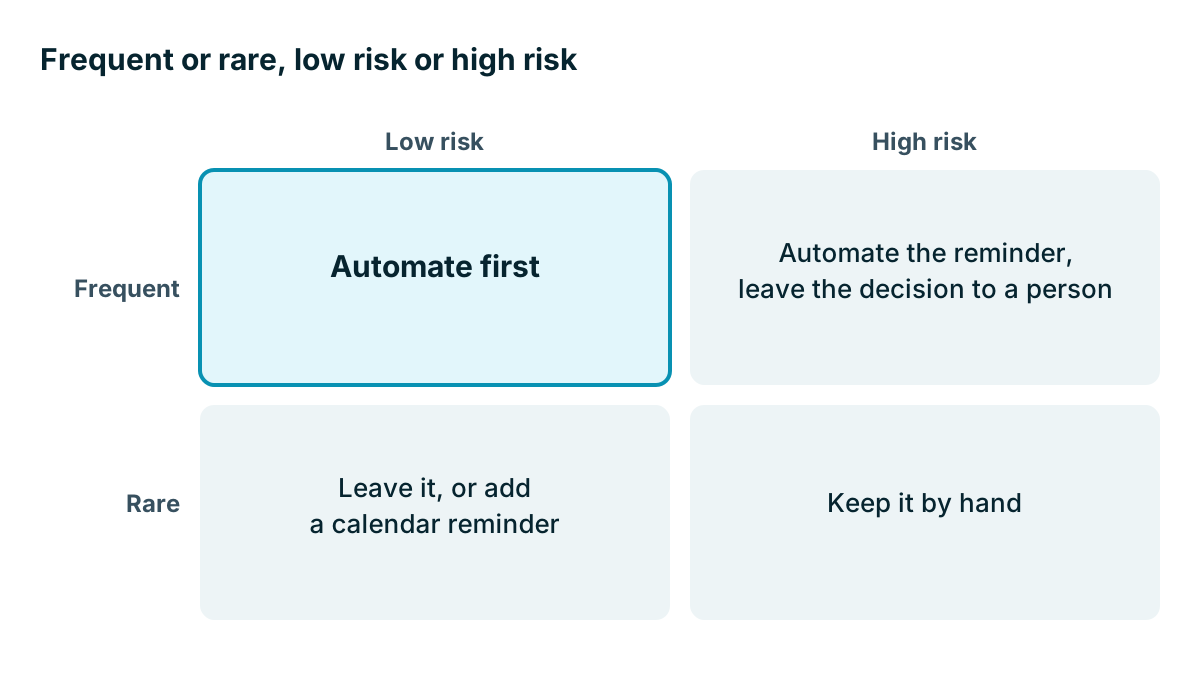
- Is it frequent? A job that happens twice a year isn't worth building a rule for, unless missing it is costly.
- Is it boring? If the person doing it adds nothing by thinking, a rule can do it.
- Can you write the rule? You should be able to say when it happens and what to do, with no it depends.
- Is a mistake cheap? If the rule misfires, can you fix it with an apology or less?
Tasks that fail question four need the most care. A reminder to a staff member that fires twice is a shrug. A wrong price sent to 300 customers is a bad week.
A worked example
Here is an invented commercial cleaning firm with six office staff. The owner lists its repeating tasks and estimates the time they take. All the numbers are made up.
| Task | Times a month | Minutes each | Hours a month |
|---|---|---|---|
| Reply to a new enquiry to say we got it | 80 | 3 | 4 |
| Remember to chase sent quotes | 45 | 8 | 6 |
| Retype won deals onto the job sheet | 15 | 20 | 5 |
| Remind the account manager about renewals | 3 | 15 | 0.75 |
| Write a tailored proposal for a large site | 8 | 90 | 12 |
| Total | 27.75 |
The biggest number is the tailored proposal at 12 hours. It's also the worst candidate for a simple rule, because the time is spent thinking about what that site needs. A template can shorten it, but no rule can write it.
The firm picks three:
- Quote chasing. It's frequent, the rule is simple, and each forgotten follow-up may be a lost sale. This one goes first. It's not the biggest on time, but it has money attached.
- New enquiry reply and assignment. It's simple, and it means no enquiry sits unnoticed.
- Won deal to job sheet. It removes retyping, but it depends on fields being filled in properly. This one goes third, after a clean-up.
Renewals take under an hour a month and yet they stay on the list, as a reminder only. A renewal missed is expensive, so this is the case where rare but costly gets a rule. Compare it to question one above.

What three automations should most small businesses start with?
If you skip the audit, three starting points suit most small service businesses.
- Assign and acknowledge new leads. A lead comes in, an owner is set, a task appears and a short reply goes out.
- Follow up on quotes. A task appears some days after a quote is sent, if the deal hasn't moved.
- Flag stuck deals. If a deal has had no activity for a set time, tell its owner.
Notice that two of these three only create tasks for people. They send nothing to customers. That is on purpose. Internal reminders are the safest place to learn, because when one goes wrong, only your team sees it.
What not to automate
Some things look efficient and quietly cost you customers.
- Replies to complaints or upset customers. A person has to read those.
- Price changes and discounts. Anything that moves money needs a person to decide.
- Deleting or merging records. These are hard to undo.
- Cold messages to long lists. Beyond the risk to your reputation, there are rules about marketing messages that vary by country, so check the ones that apply to you.
- Anything that pretends to be personal when it isn't. Customers can usually tell, and a badly filled-in template is worse than nothing.
Watch out
A task someone has to do is cheap to build and easy to ignore. If your automations create 40 tasks a day, people will stop reading them, and you will have made a noisy new version of the old problem. Keep the number small enough that every task gets done.
How much is it worth?
Use the same sum from Chapter 1. Add up the hours saved, multiply by what that time is worth, and compare it with the cost of the plan that includes automation. In the cleaning firm's example, the three picks cover 4 plus 6 plus 5 hours, which is 15 hours a month before you allow for checking and upkeep. Automations need looking after, so be modest. If you call it 10, you are less likely to fool yourself.
Automation limits also matter here. As Chapter 2 pointed out, some plans cap the number of automations or runs, and the automation you need may be one tier up. Check that before you design anything.
Start with one rule, not three. Run it for two weeks. Check that it does what you meant. Then add the next.
Key takeaways
- Only automate something that already works when done by hand.
- Good candidates are frequent, boring, easy to describe and cheap to get wrong.
- Start with internal reminders and tasks, because mistakes stay inside the team.
- Keep people on complaints, money and anything that's hard to undo.
Common questions
Which tasks should I keep off automation?
Keep replies to complaints, price changes, discounts, and deleting or merging records with a person. Anything that moves money or is hard to undo needs a person to decide.
How many automations should a small business switch on at first?
Start with one rule, not three. Run it for two weeks, check that it does what you meant, and then add the next.
Why does automating a messy process make things worse?
Automation runs the process you have, only faster and more often. If the steps are muddled, you get muddled results at scale.
Keep your place and test yourself
Enroll for free to save your progress, take the chapter quiz, and get a certificate when you pass every chapter. The lessons stay open to everyone either way.