
- quotes
- approvals
- product-updates
The discount that should have needed a second look
A rep can drop a margin below the floor to close a deal, and nobody notices until the invoice looks wrong; this is the stretch where Coeffection learned to pause a risky quote for a manager's sign-off before it goes out, plus a gate reps can't type around, one-click Slack approvals, SLAs on templates, and pipelines that promote themselves.

Every sales team has a version of this story. A rep is chasing a deal before the end of the month. The customer leans on price. The rep, wanting the win badly enough, drops the margin lower than anyone would have signed off on, sends the quote, and moves on to the next fire. The number looks fine on the quote. It looks a lot less fine three weeks later, when finance is staring at the invoice and asking who approved it. Nobody did. That was the whole problem. There was never a moment where anyone had to.
So the biggest thing we shipped this stretch was a way to build that moment in, before the quote leaves the building instead of after.
A rule that watches the margin
In Coeffection you can now write approval rules against the actual numbers on a quote, and the first one most teams reach for is margin. Set a rule that says require approval when margin drops below cost, or below whatever floor your business really holds, and from then on a quote that crosses that line cannot be sent until a manager says yes. The rep still builds the quote. They still apply the discount they want to fight for. They just can't fire it off into the world on their own once it dips past the number you drew.
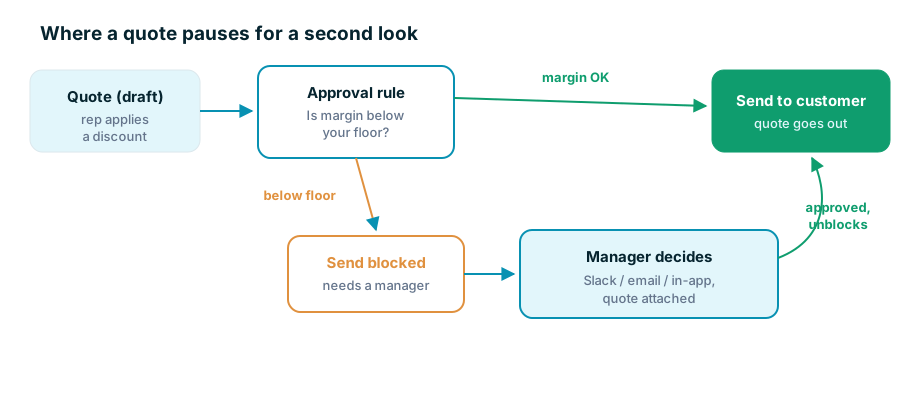
The margin itself got easier to reason about in the same stretch. A quote column can now be a real two-way margin lever. Type a margin and the line reprices to hit it. Change a product option and the line holds your margin instead of snapping back to some model price you never asked for. And because margin is a first-class column now, a rule can point straight at it. Below your floor, the quote needs a second look. Above it, nothing gets in the rep's way.
The gate you can't type around
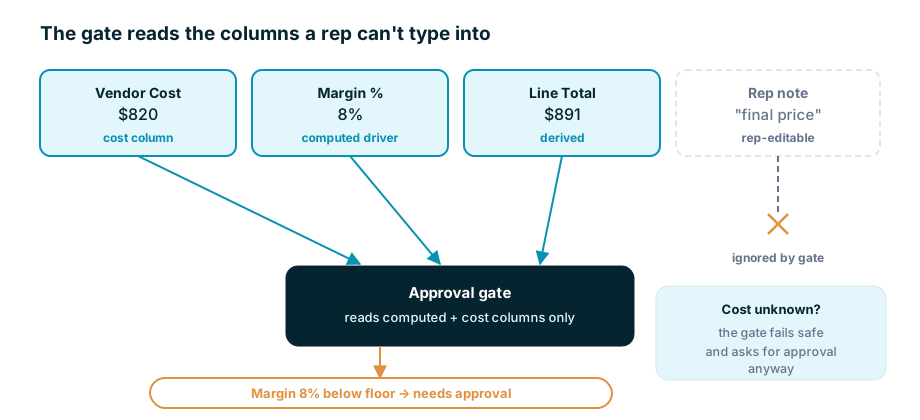
Here is the part we cared about most, and it is the part nobody will ever see. If a rep can type a number into a column, and that column is what the approval rule reads, then the rep can type their way out of ever needing approval. That is not a gate. That is a polite suggestion.
So the approval gate is server-authoritative, and it trusts only the columns it should. It reads the computed margin and the cost-driven columns, the ones a person cannot hand-edit, and it ignores anything a rep can type into. If the cost of something comes back unknown or indeterminate, the gate does not shrug and wave it through. It asks for approval anyway. It fails toward the second look, never away from it.
We cleaned up the quote columns themselves so all of this sits on solid ground. Each billing column now carries a single Type: currency, whole number, decimal, percent, or formula. Formula columns build from a click-in palette instead of a syntax you have to memorize. Mark a column customer-visible and it threads onto the PDF, the HTML preview, and the email on its own. Mark it used in approval rules and it shows up in the condition builder. It is all opt-in, so an admin turns it on when they want it, and until then quotes look and behave exactly as they did.
The request has to reach a human
A gate that blocks a send is only half the job. The other half is getting the decision to the person who can make it, quickly, because a rep sitting on a blocked quote at five on a Friday is a rep who is about to call you. So an approval request now goes out over Slack and email with the quote attached, and the manager can approve or reject right from the message. The moment they approve, the send unblocks itself.
To make that painless we added one-click Add to Slack. Open Admin, Integrations, Slack, press one button, pick a channel, done. There is no separate Slack app to build and no tokens to shuttle between two browser tabs. Coeffection posts notifications and quote-approval requests straight into the channel your team already lives in. If you would rather bring your own Slack app, that still works too.
And the rest of the stretch
Not everything from these weeks is about discounts, and that is fine. You can now put a real clock on a template, an SLA that starts when a task lands on a stage and stops when it clears a later one, following your actual business hours, with an on-track, warning, or overdue badge showing everywhere the task appears. Automatic promotion rules finally auto-promote, so an opportunity that reaches Close Won creates its project the instant it lands there instead of waiting on someone to remember a confirm dialog. Promotion rules can also return a record to its original, full history intact and no duplicate left behind. And the roles grid now behaves the same for every role, system or custom, so the person you want approving those discounts actually can, and the person you don't, can't.
Underneath all of it is one idea. Your process already has the places where a person is supposed to stop and look. Good software doesn't quietly delete those places to feel faster. It puts them exactly where you meant them to be, and makes sure nobody walks past them by accident.