
- contracts
- e-signature
- quote-to-cash
The deal was won. Then it sat for a week.
A won deal used to leave the CRM to get branded, approved, signed, and billed, losing days at every stop. Here is how the finish of a deal moved into one place: a branded portal, native Accept and Sign plus DocuSign or Dropbox Sign, approvals before Send, and a QuickBooks estimate that syncs itself.

Closing a deal used to be the fun part. You get the yes, you shake the hand, and then the deal quietly disappears for a week. Someone exports the quote to a PDF. Someone attaches it to an email. The customer opens it three days later, has one small question, and there is no way to sign the thing they are looking at, so they wait for a contract to arrive from a different tool with a different login. It gets signed eventually, somewhere your CRM never sees. Then someone re-keys the whole order into accounting by hand. Every one of those steps is a door the deal has to walk through, and behind every door is a day.
So the work this stretch was about closing those doors. Keep the finish of a deal in the one place the deal already lives, so a won deal never has to leave the room to get signed.
Sign without leaving the deal
The center of it is a new Quote and Invoice Designer and the portal it feeds. You build a branded template once, the logo and the colors and the exact line-item columns you want, then send a quote as a password-gated link instead of an attachment. The customer opens a real page, not a download, sees your brand, and can accept and sign right there. Native Accept and Sign is a typed name and a consent box, captured with a timestamp and the signer's IP, so the acceptance is recorded and defensible without anyone leaving the page.
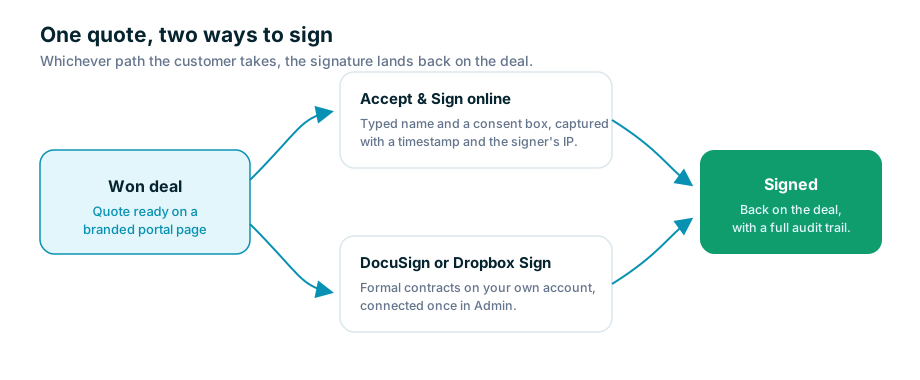
For the deals that need a formal contract, the same quote can go out through DocuSign or Dropbox Sign instead. Those run on your own account, connected once in Admin under Integrations, so the paper trail lives exactly where your legal team already expects it. Either way the signature comes back and lands on the deal itself, and quote lifecycle automations can fire a notification the moment a customer opens the quote or accepts it. You find out from the software instead of from a follow-up call that goes to voicemail.
The email they actually open
A signing page only helps if the customer gets that far, and a plain-text link with a password rarely survives a busy inbox. So we let you design the email too. The Customer Email template is the same drag-and-drop idea as the quote itself: a logo header, a hero, your brand colors, an automatic summary of what is included, and a real View Your Quote button. When a rep sends, they pick the template and write a short personal intro with merge fields like the customer's first name, and the rest renders from the template and the quote's own numbers. The secure link and one-time password still ride along, tucked inside something that looks like it came from you.
Approvals that happen before Send, not after
There is a quieter problem hiding in all of this. The faster it gets to send a quote, the easier it gets to send one that never should have gone out at that price. So sign-off now happens on the way in, not as a surprise at the end. You write approval rules against a quote field or a single line, a discount over some percent, a margin below cost, a vendor cost past a threshold, and a matching quote shows a banner the moment a rep trips one, with a plain reason and a Send for approval button. The rep is not blocked from working; the quote is just gated at Send until someone signs off. Approvers can act from Slack, from email, or in-app, and a rule can require an intake form first, the current PDF, the markups, the proposed discount, a written justification, so the approver decides with the whole picture instead of a number and a shrug.
And the money side keeps up
The last door was accounting. Sending a quote now pushes it to QuickBooks Online as an Estimate under the right customer, the same lines and quantities and prices and tax treatment, and re-sending updates that same estimate instead of spawning a duplicate. Nobody re-types anything. A new field-mapping screen lets you decide which fields flow which direction for each record type, so the sync matches how your books are actually kept rather than how some default thinks they should be.
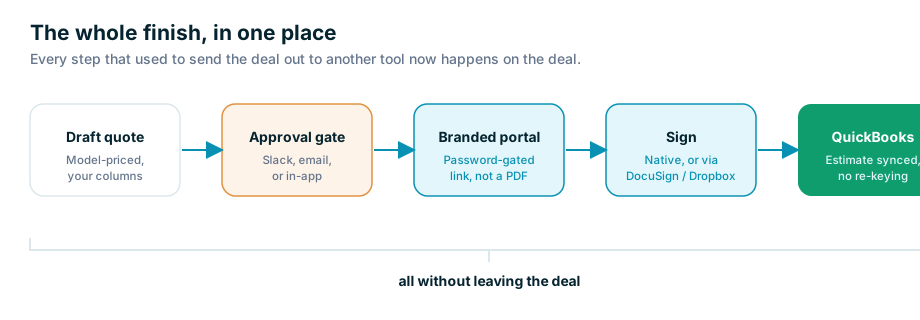
None of this changed what a deal is. It changed how far a deal has to travel to get done. A quote used to leave your CRM to get branded, leave again to get approved, leave again to get signed, and leave one last time to get billed, and every departure was a place it could sit and cool off. Now the whole finish happens where the deal already lives. You still get the yes and shake the hand. The difference is the week that used to come after.