
- pipelines
- automation
Not every deal runs in a straight line
The spring we stopped treating the pipeline like a filing cabinet and started treating it like a set of rails: branching stages, work that starts itself, and a way to see all of it without digging.

Every CRM starts you off with a straight line. Lead, then qualified, then proposal, then won. It looks clean in the demo. Then you try to run your actual business through it, and within a week you have deals sitting in a stage that does not describe where they are, because the real work took a turn the software did not allow.
Real work forks. A proposal goes out and it either gets approved or it comes back for a revision, and those two outcomes lead to completely different next steps. A permit clears or the city kicks it back. A design passes review or it goes another round. Force all of that down one lane and the board stops telling you the truth.
So the first thing we did this spring was let pipelines branch.
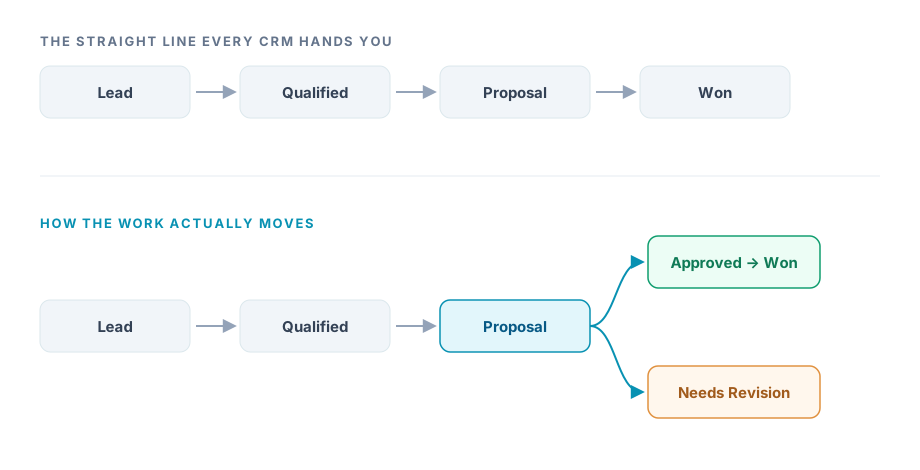
In Coeffection a stage can now lead to more than one place. Draw a second path out of a stage and you name the branch, so Proposal splits into an approved path on one side and a revision path on the other, each with its own stages after it. The first branch you draw becomes the trunk automatically, and you can promote any branch to trunk later with a single action, so the main line of your business stays obvious at a glance. On the list view, a deal's stage pill now carries its branch label, so you can tell an approved proposal from one that went back without opening a thing.
That was the headline, but it was really the start of a bigger idea. A pipeline is not just a place to park deals. It is the shape of how your business runs. And if the software understands that shape, it can start doing the work with you instead of only recording it.
Work that starts itself
Here is a pattern every operations person knows by heart. A job hits a certain stage, and that stage always means the same handful of things need to happen. Materials get ordered. A crew gets scheduled. The customer gets told it is underway. It is the same checklist every time, it lives in someone's head, and the day it slips is the day that person was busy.
So we built a workflow engine underneath the pipelines and wired it to the stages themselves.
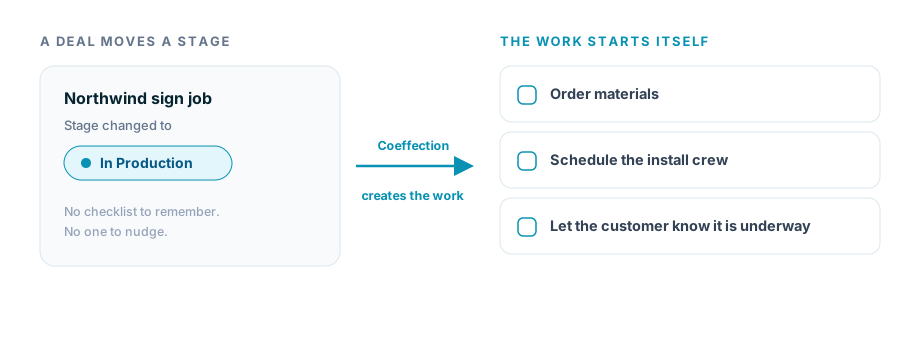
Now moving a deal into a stage can create the work that stage requires, automatically. Define the tasks once, attach them to the stage, and from then on the checklist appears the moment a deal arrives, assigned and ready, without anyone remembering to set it up. Under the hood it runs on a real job queue with idempotency built in, which is a technical way of saying the same stage change never spawns the same task twice, even when something retries. You do not see any of that. You just see that the work was already there when you looked.
That is the quiet difference between a system that stores your process and one that runs it. The pipeline stopped being a filing cabinet and became a set of rails.
See the work without opening the deal
The other thing that happens when work starts flowing on its own is that there is suddenly more of it to keep an eye on. A list of a hundred deals is not useful if you have to open each one to see whether its tasks are done.
So we added Quick View. Any row in an entity list now expands in place to show what is actually going on underneath it, the open tasks, the key fields, the recent activity, without leaving the list or losing your spot. You can group the view the way your team is organized, move through it with the keyboard, and choose exactly which panes appear. It turns a flat list into something you can work from, which is where most people spend their day anyway.
And a hundred small things
Not everything from these weeks makes a headline, and that is fine. A lot of the work was the unglamorous kind you only notice when it stops getting in your way. Entity lists that used to be lopsided and right-aligned now line up cleanly. Filters and your chosen view mode stick between visits instead of resetting every time. Relationship fields let you add several links and spin up a brand new record inline, right where you needed it, instead of stopping to go create it somewhere else. Contacts and every other core record moved onto one consistent entity foundation, so they all behave the same way.
None of those are the reason anyone picks a CRM. All of them are the reason people quietly start to trust one.
That was the spring. Pipelines that branch the way your work actually branches, a set of rails that starts the work for you, a way to see all of it without digging, and a long list of rough edges filed down. The theme underneath every piece of it is the same one that still guides us. Your business already has a shape. The software should take that shape, not hand you someone else's.