
- client portal
- notifications
- customer experience
The update email you keep forgetting to send
How Coeffection's customer portal keeps clients in the loop without the update email nobody remembers to send: a branded project view you control field by field, double opt-in notifications the customer turns on and off in one click, and emails that finally say which project and property they're about.

Every project has a moment where the customer goes quiet, and then it goes the other way. A week passes with no word from you, and the email lands. "Just checking in, any update?" It's a fair question. A permit came back, a file went up, a stage changed. You knew all of it. You just never got around to telling them, because writing the update email is the task that always loses to the task in front of it.
The honest version is that customer updates are a discipline nobody keeps. It isn't that people don't care. The update is manual, it depends on someone remembering, and the day it slips is the day everyone was heads-down doing the work. So the customer fills the silence with a phone call, and now you're doing the update anyway, worse and later and on their schedule.
This spring we spent a stretch making that whole problem go away. The shape it took was a customer portal that keeps people in the loop without anyone writing the email.
The starting point was plain. A staff user clicks Share portal on a company, and the customer gets a secure magic link. No password, no account to create. They open it and see only their own projects, grouped by stage, with statuses, owners, and files they can download. Comments run both ways, so a client can message you on a project and you both get an email. Nothing appears in it until you decide to share it.
You decide what they see
A portal that shows customers everything is worse than no portal. Internal notes, margins, the stage somebody named snippy at 5pm: none of that is for them.
So sharing is an allowlist, not a firehose. In Admin, Settings, Portal you pick which record types clients can see. Projects are the default, but you can drop them and add Orders or Properties or anything else. For each type you then pick exactly which fields show up. Everything is hidden until you opt it in, and the projection happens on the server, so a field you didn't share is never sent, not just hidden in the page. Files, comments, and client uploads each toggle on per type.
That last one runs the other direction. Clients can upload files straight into your own Dropbox from the portal, into a per-project folder the system creates, and nothing lands on us. You also choose how long a share link stays good, 30, 60, 90 days, or never, and you can preview the whole client view yourself before a single email goes out.
Let the customer decide, not you
Here is the part that fixes the forgotten email for real. Automatic updates only work if the customer actually wants them, and the fastest way to get marked as spam is to start emailing people who never asked.
So we didn't switch notifications on for everyone. We put the customer in charge of them. On the portal home there's a Get Notified card. A client opts in, gets a confirmation email, clicks to confirm, and only then picks what they want to hear about: project status changes, replies to their comments, or both. That confirmation step is the whole trust model. Nobody receives an email they didn't knowingly ask for.
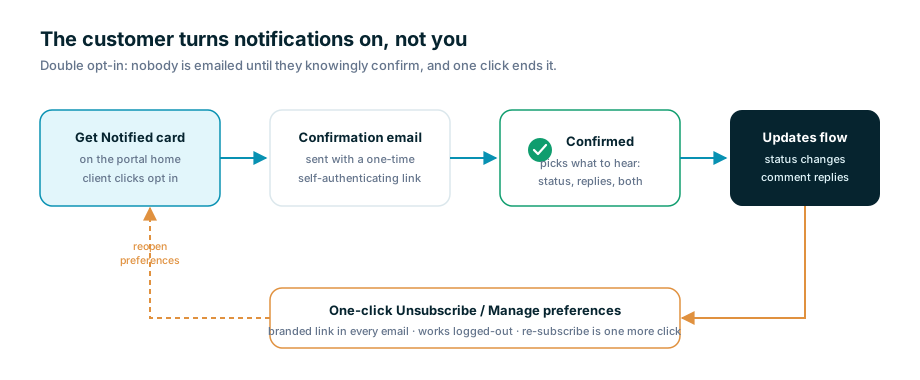
Every message that goes out after that carries a real, branded unsubscribe link. The one-click kind, that opens a confirmation page on your own portal and stops the emails. Re-subscribing from there is one more click. Already-subscribed clients see a quiet Manage notifications control instead of the opt-in card, so they can turn it up or shut it off whenever. And a new per-type admin toggle, Email client on staff reply, lets you email a customer when your team answers their comment, but only if they opted in, and never about their own message.
All of those links had to work for someone who isn't logged in, because a customer never is. Each one carries its own one-time token and authenticates itself, so clicking Unsubscribe from your inbox actually unsubscribes you instead of bouncing to a staff login no customer could pass.
Emails that say what they're about
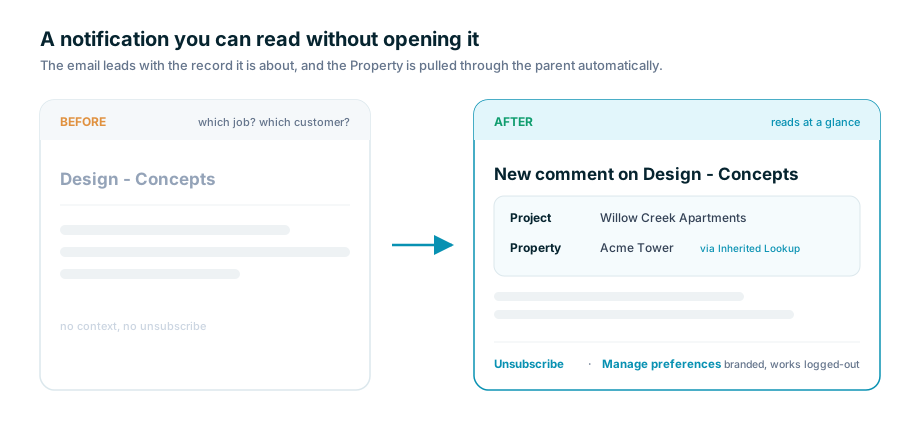
An update is only useful if you can tell what it's about from the subject line. A notification that just reads "Design - Concepts" makes the reader open it to find out which job, which customer, which anything.
So notifications grew a context block. A task email now leads with the parent it belongs to, the Project or Opportunity, labeled by its type, then the Property that project sits on, then the task itself. The in-app bell shows the same thing, so both channels tell the full story instead of a bare task name. The labels are bold and solid dark now instead of a washed-out gray that read like fine print.
The property line is quietly clever. A task doesn't link to a property. It links to a project, and the project links to the property. A new Inherited Lookup field type walks that chain for you and surfaces the sibling value the record couldn't reach on its own. Nothing is stored and nothing is typed in, so it can never go stale, and a task email can read "Fix HVAC, Property: Acme Tower" without anyone ever entering Acme Tower on the task.
And a hundred small things
Not everything from these weeks is a headline. The linked-records table on a record got resizable columns that fit long names before they truncate. Deleting a custom field now clears it out of saved list columns instead of leaving a ghost reference behind. Magic links stopped getting "used up" by the email scanners that fetch every link seconds after delivery. The client view collapses cleanly to stacked cards on a phone. None of those win anyone over on their own. Together they're the difference between a portal a customer tolerates and one they trust.
That was the run. A portal that shows customers their own work, an allowlist so it only ever shows what you meant to share, notifications the customer switches on for themselves and can switch off in one click, and emails that actually say what they're about. The forgotten update email isn't a discipline problem you can nag your way out of. It's a thing the software should just do, quietly, on the customer's terms. Now it does.