
- lead enrichment
- integrations
- workflow
A company name is not a lead. Yet.
A bare company name, or a naked project address, is not a lead yet: here is how Coeffection turns one into a real lead you can call, with a pre-flight readiness gate before you spend a Clay credit, Gemini research that follows the money to the developer and the whole capital stack behind a deal, signed inbound sources that let leads arrive on their own, and notifications that reach the right person the moment one does.

Every lead-gen list starts you with less than you'd think. In real estate the row that drops into your inbox reads something like "412 units, mixed use, 1400 West Grand, permit filed." That is a building. It is not a company, it is not a person, and it is nowhere close to a phone number. Somebody is going to spend forty million dollars putting it up, and all you have to work with is an address and a hunch about who's behind it.
Tools like Clay and Apollo are very good at the last step of this. Hand them a company domain and they'll hand you back the decision makers, their titles, their emails, the works. The catch is the first step. Half the time you don't have a domain. You have a project and a blank space where the developer's name should be. So this stretch went to closing that gap, turning a bare name into a lead you can actually call.
The first thing we did was stop people firing blind. Clicking "Find contacts with Clay" used to just go, credit spent, fingers crossed. Now it opens a pre-flight gate first. You get a readiness score, a plain percentage with a Weak, Fair, or Strong tier, built from whatever company signals we're actually holding. The checklist under it doubles as a form, so you type in a website or a LinkedIn URL and watch the number climb before you commit to anything. Discovery only gets blocked when there's truly nothing to search with, and then it tells you exactly what to add.
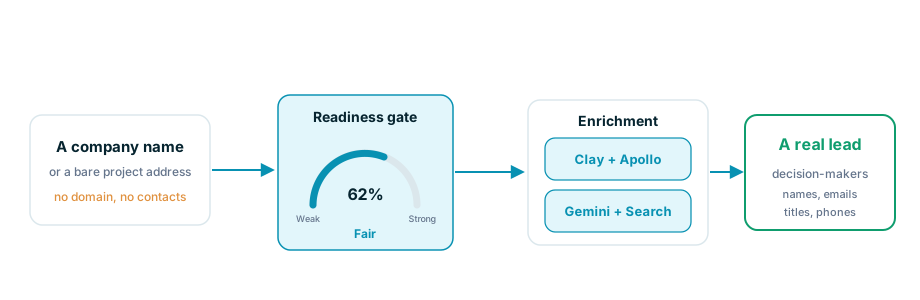
The gauge is honest about a weak lead, which is the whole point, but being honest doesn't fix it. So right next to it is an "Auto-find with Gemini" button that does. It runs Gemini with Google Search grounding to fill in the missing website, LinkedIn, or headquarters city, and hands it back for you to review before you spend a credit. Anything it returns gets validated, so a guessed or junk URL is dropped instead of saved. And whatever you add, by hand or from Gemini, is kept on your side and waiting the next time you open that prospect. It never writes back to your source list.
Follow the money
The gate handles a lead that's merely thin. Plenty of them are worse than thin. You have the project in full, the address, the unit count, the construction value, the architect, a YIMBY writeup, and still not one name to enrich, because you don't yet know who's building it.
So we taught the auto-find step to work backward. When a lead is rich on the project and blank on the company, Gemini researches the project itself to figure out who's behind it, and returns the developer's name, website, and LinkedIn. That's the exact domain Clay was missing, handed over on a lead that used to come back empty.
Then we pushed past a single developer, because one name is rarely the whole story. A real estate deal has a stack of players behind it, and any of them could be your customer. The Lead Inbox now has a Companies section with a "Find companies with Gemini" button that returns the entire capital stack: the developer, the equity partner, the construction lender, the architect, the general contractor, each one tagged with its role, website, and LinkedIn, and a source citation so you can check the work. It runs once and stays on the lead, so reopening the record never re-spends a thing.
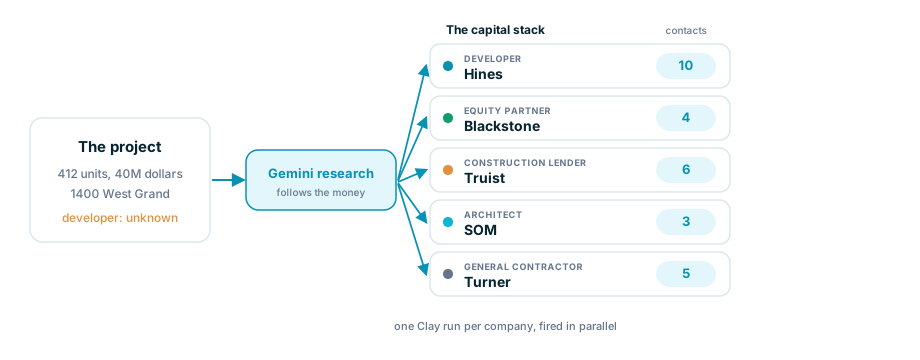
From there you pick the companies you actually care about and fire a Clay run for each one at once, and the panel counts contacts as they land, Hines ten, Truist six, filling in beside the lead instead of hiding below the fold. Each contact arrives with a name, a title, an email, and now a phone number, right in the column where you were already looking.
Leads that show up on their own
Enrichment turns a name you have into a lead. The other half of the problem is the names you never see, the ones sitting in a Typeform reply or a Stripe event or a partner's webhook, waiting for somebody to copy them across by hand.
So we built Inbound Sources. Each one is a per-tenant, signed endpoint that can only stage an incoming event, never write a record on its own. You wire up a workflow with a new External event trigger that turns the staged payload into whatever you need, a Contact, then a Lead linked to it, pulling fields straight off the event. You decide how it lands: Auto processes it on arrival, or Review holds each event in an inbox for a person to promote or reject. The signing secret shows once and is encrypted after that, the editor ships copy-paste signing snippets, bad signatures and replays are turned away the same way every time, and a reaper recovers anything that gets stuck so nothing goes quietly missing.
And then somebody hears about it
None of this counts for much if a fresh lead lands and just sits there. So notifications grew some teeth this stretch as well. You can take your CRM alerts as a Slack DM now, per event type, from the same preferences grid as in-app and email. Comments got an @-mention picker, so tagging a teammate actually pings them. Admins can mark any field "notify on change," and a burst of edits to one record collapses into a single message instead of ten. And the alerts finally say something useful, naming the record, the person who acted, and the stage it moved to, instead of "an opportunity moved."
That was the stretch. A gate that tells you whether a lead is worth a credit, a way to follow the money from a building to the people behind it, a door for leads to arrive through on their own, and alerts that reach the right person when they do. A company name showed up at the start of all of it. By the end it had a face and a phone number, which is the only kind of lead worth having.